

View the current Changelog for the newest updates.This page is a historical archive of updates older than September 2023. This is kept separate from the current changelog to keep page navigation faster while retaining older updates.
- The Working with databases guide was revised to improve its readability and to make additional resources easier to find.
- Notion’s Postman collection for the API was updated. Be sure to pull recent changes into your forked version.
- A reminder was added to the Comments endpoints to update integration capabilities for comments prior to using the endpoints. (Read/write comment capabilities are off by default and can be turned on in the integration dashboard.)
- General clean-up and improvements, including code formatting.
- The Build your first integration guide was rewritten with new demo code to help developers learn how to use Notion’s API even faster.
- A new sample app was added to the Notion SDK for JavaScript
/examplesdirectory. This completed sample app is referenced in the new Build your first integration guide.
- A new sample app was added to the Notion SDK for JavaScript
- The description for the
block_idpath parameter was updated for the Append block children endpoint to indicate that a block ID or page ID can be used. - A clarification was added to documentation for retrieving/updating database properties: If a property is based on a relation to another database, the related database also needs to be shared with the integration.
- A clarification was added to documentation for querying databases. When filtering a multi-select property, the
containsfield will filter for exact matches for the string provided. - The Working with comments guide was updated with additional examples to distinguish between creating page comments and inline discussion comments.
- The Create a comment endpoint description now links to the Working with comments guide to help developers find additional resources faster.
- If you haven’t already, join our Notion Devs Slack group to learn from other developers building with the public API.
Notice for an upcoming Public API change
We will soon be rolling out changes to the Formulas property (Formulas 2.0), and as such, we will be making a change to the Notion Public API.
This is a non-versioned change and is expected to be in effect in the next couple weeks.tl;dr: As part of the Formulas 2.0 rollout, the Public API’s format of the string value forformula.expression will be changing. Public API calls with formula inputs in the old format will still succeed. On write operations, the old format will be supported indefinitely, but on read, only the new format will be returned. This change is being made to improve the formulas experience and ensure parity with the Notion app.No action is required for creating or updating database formulas. Reading database formula.expression values may require developer changes.What do you need to know?
The string value offormula.expression is changing; the schema is not.- On write via the Public API (create or update database endpoints), Notion will support using the old format as a Public API input in the formula property schema indefinitely and will support writing in the new format.
- Database objects returned via the Public API will have the new formulas 2.0 format.
Why is this happening?
Notion databases allow you to build a fully customizable system for you and your team – they provide a place where you can keep all your information in one place, with the ability to build views, filters, and workflows that can be adapted to your needs.The formula property helps you take that even further – allowing you to perform calculations, create specialized views, and provide an extra layer of insight based on information in other database properties. It helps expand what you can do in Notion databases.We are improving the formulas experience so that:- It’s easier to write formulas.
- Formula outputs look and feel more native to Notion.
- The formula language can fulfill more specific needs.
What do you need to do?
This is a non-versioned change that will not affect most developers. As mentioned, the formula property format will still have the same schema in the Public API; only the value of theformula.expression field will change.Keep an eye on this changelog for when the update becomes available in the Public API.- Notion is excited to announce our Technology Partnership Program. 🎉 This program is open to companies who have built a public integration and are interested in improving and scaling their integration with Notion’s support. If you think your integration and company could be a fit, learn more and apply here.
-
We’ve updated our API reference docs to include information on Notion’s wiki databases and verified pages. Updates include:
- An overview on wikis in the guide to working with databases.
- The
verificationpage property was added to the Page properties documentation. - The Create a database and Query a database endpoint documentation was updated to reflect API changes related to wikis. Namely, that querying wiki databases can return both Page and Database objects.
-
The Error codes section in the Status code page was updated to include examples of the
"message"returned with each type of API error, as well as descriptions of the issue each error code represents. - A number of sample cURL commands in our docs were still using an old Notion Version in their headers. These have all been updated.
- A clarification was added to the Authorization guide that the Notion Version is always required in public API request headers.
- A new integration example was added to the Notion SDK for JavaScript repo. This example shows how to get the plain text from any block type currently supported by the public API.
- The new unique ID page property was added to the Page properties documentation. When used, the unique ID (
unique_id) auto-increments for every new page created in a database. An optional prefix can be included that will be applied to the ID values.
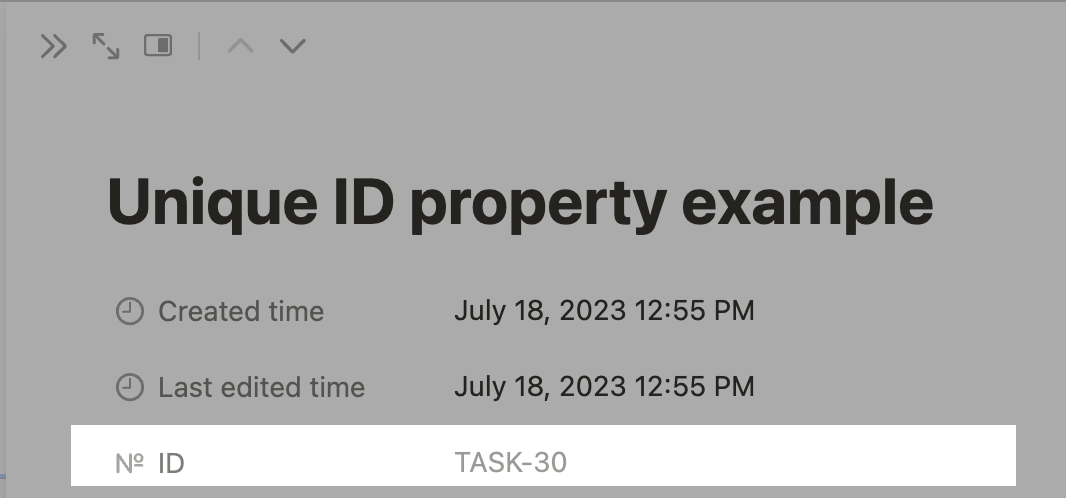
The unique ID in a Notion page's properties
- Workspace Owners can now see all internal integrations created in a workspace via the integration dashboard. This includes integrations created by themselves and other Workspace Owners. We’ve included this information in our Getting Started guide.
- A Notion SDK for JavaScript code sample was added to the Create a database endpoint documentation.
- We updated our Getting started guide to help developers who are new to the public API better understand how the API relates to integrations.
- The Block object docs were updated with a tip on how to embed Vimeo links in a Notion page via the API.
- A new
afterparameter has been added to the Append block children endpoint. Developers can now specific where to append a new block, instead of appending it to the end of a parent block by default. - The Authorization guide had a clarification added to help developers find the resources they need for Link Preview integrations.
- The new
public_urlproperty was added to the docs. When a page or database has been shared publicly, the response body will include apublic_urlvalue. - The Retrieve block children endpoint documentation was updated to help developers who are new to the public API better understand the endpoint’s functionality.
- The Retrieve a block endpoint documentation was updated with some additional information related to working with page content.
- The
invalid_grantcode was added to our Status codes documentation. This code is returned when the authorization grant (e.g. token) provided is invalid. For example, a status code400with aninvalid_grantcode will be returned when the token provided has expired. - The Rich text documentation was updated with additional information on what rich text is and how the Notion uses it.
-
Our guides and docs related to Link Preview integrations have been updated to help developers find the information they need faster. Improvements have been made to the following guides and API reference docs:
- Getting started guide
- Introduction to Link Previews guide
- Link Preview integration guide
- Unfurl attribute object docs
-
We added more information about the
plain_textproperty found in therich_textobject. Learn more about rich text in our Rich text object docs. - The docs related to filtering and sorting database queries now have more code examples for developers building integrations with the Notion SDK for JavaScript.
- We reorganized the REST API reference navigation bar after removing the “Other” section to make its child pages easier to find.
- The Query a database and Filter database entries docs were updated with additional code examples of passing single and multiple filters.
- The Working with comments guide was updated to clarify how to retrieve and add comments using the REST API.
- The references docs for
rolluppage properties, as well as the Retrieve a page property and Retrieve a page endpoints were updated with additional information related to limitations. In cases where a page property — like a rollup — has more than 25 references, the Retrieve a page property endpoint must be used to receive a complete response. - An outdated Changelog URL now redirects to this Changelog page to help avoid confusion.
- We added a database schema size recommendation of 50KB to our docs to help developers manage their database query performance. It is strongly recommended that developers keep their schema size under this number.
- The Update a database page was updated to improve readability. Additional information on how this endpoint differs from related endpoints was also added to help developers better navigate the REST API docs.
- The Query a database page was updated with additional information about the
filter_propertiesquery parameter. When used with the REST API, this query parameter is passed as a string, like so:
filter_properties option accepts an array of property ID strings:- Docs that mention the
redirect_uri— a value used with public integrations — were updated to clarify when this value is required. Refer to the Create a token page for a complete description. - The video block-type was updated on the Block Object page to clarify accepted video types. YouTube URLs that contain
watchorembedare supported video types. - The Append a block page content was reorganized to improve readability.
- Link Preview integration docs were updated to reflect a change regarding how link previews are enabled in the integration dashboard.
- The versioning page was updated to clarify that the
Notion-Versionheader is required in Notion REST API requests. - The parent object page and API reference docs for database POST requests and blocks PATCH requests were updated to better explain how parenting rules work.
- The Integration guide was updated with more links to help developers find resources faster.
- Number database properties now support the Peruvian sol as a currency format. To use it, set
"peruvian_sol"as the value for a number’sformatfield when creating or updating a database property or schema. - General docs housekeeping, such reducing the number of callouts in our API reference docs to improve the readability.
- Our developer community Slack invite link was updated. Join here to connect with other developers building with the Notion API.
- The Authorization guide was updated to include more information on creating integrations, adding templates to public integrations, and more code examples to get you started, faster.
- We’ve added more code examples to our API reference docs, including Archive a page and Authentication.
- General docs housekeeping, such reducing the number of callouts in our API reference docs to improve the readability.
We don’t have any changes to announce this week! Stay tuned, and in the meantime check out our platform roadmap for a look at what we’re building.
Fixes and improvements
- You can now update rollup database properties via the API. To programmatically update a
rollupproperty, send a PATCH to Update a database that specifies the change in thepropertiesbody param.
We don’t have any updates to share right now. Stay tuned for the next changelog! To get a sense for what we’re heads down working on, check out the platform roadmap.
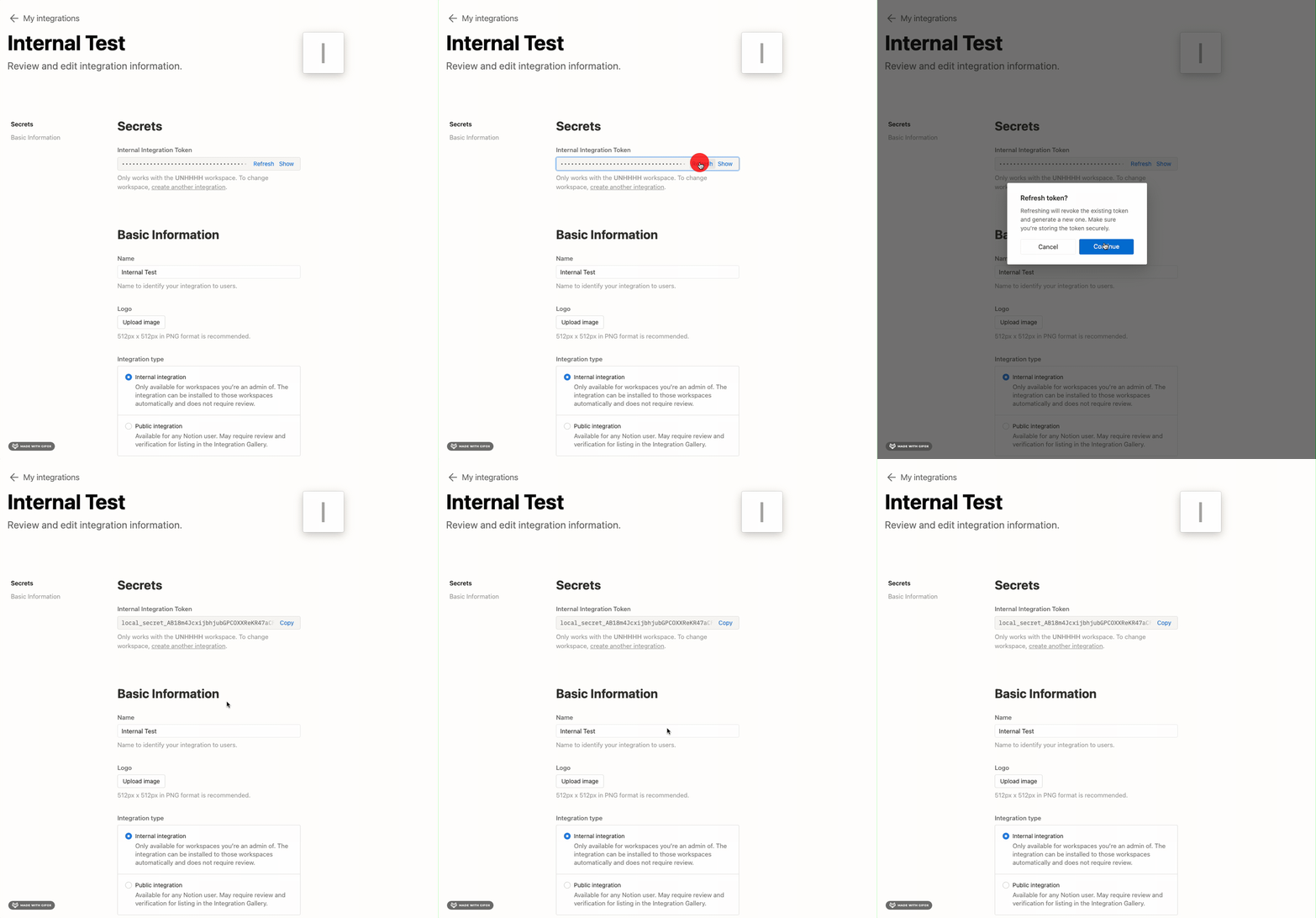
New things
- Shipped detailed docs for Link Previews including an overview and reference materials.
Fixes and improvements
- The Retrieve a Page endpoint can now return specific page property values when you include the
filter_propertiespath param. - You can now request specific page property values from a database by passing
filter_propertiesin the request body to the Query a database endpoint.
New things
- Happy 2023! For a sneak peek of what we’ll be up to this year, check out our updated platform roadmap.
Fixes and improvements
- Updated the Append block children and Retrieve block children endpoints to specific supported block types to create a more consistent dev experience. The endpoints now throw an error if the block type in the request does not support children.
New things
- Built a ✨Glitch ✨ demo that updates Notion tasks when a linked GitHub PR is closed or merged. Give it a spin!
We took advantage of the US Thanksgiving holiday to host a mini internal hackathon.Nothing to share from that, yet! It’s been a quiet few weeks.If you want something to read while you stay tuned for the next update, check out the revised Get started guide.
- We added a
this_weekfilter for database queries. You can now search for database entries where the"date","created_time", or"last_edited_time"property value falls within the current week. Refer to the date filter condition docs for details.
- You can now add a Notion template option to a public integration from the integration’s settings page. For details on what the permissions flow looks like for users who opt in to the template, refer to the Authorization guide.
- A
relationproperty value now includes ahas_moreproperty when returned by the Retrieve a page endpoint.has_moreistrueif therelationhas more than 25 page references. Otherwise,has_moreisfalse. - We added a
workspace_nameproperty to bot user objects. If the botowner.typeis"workspace", thenworkspace.nameidentifies the name of the workspace that owns the bot. If theowner.typeis"user", thenworkspace.nameisnull.
Started an experiment to improve search endpoint performance by tweaking how we call Elasticsearch under the hood.
- Fixed a bug where date mentions ended in a
→character even if they only represented a single date, not a date range. - Added an
Authorization URLfield to the public integration form. You can now click to copy the URL that allows users to authorize your integration (read more in the Authorization guide). - Corrected an error that caused the
getPropertyendpoint to return only one item if theproperty_idbelonged to a multi-itemFilespage property.
Version 2022-06-28 includes page property types and values
Responses for page retrievals, database queries, and searches will again include page property types and values. This matches the behavior in version2022-02-22 and takes effect on August 31, 2022.Features
-
The public API now supports the following functionality for
statusproperties: -
header_1,header_2, andheader_3blocks now have anis_toggleableproperty, to better indicate whether they are heading toggle blocks. (read more)- Headings can be togglified and un-togglified by setting
is_toggleableto true or false, but note that all the children inside the toggle must be removed before it can be untogglified.
- Headings can be togglified and un-togglified by setting
No updates for these past two weeks, but stay tuned for the next changelog!
Comments API
Today we’re launching a brand new set of APIs for interacting with Notion comments. This includes the ability to:- Read comments from a page or block.
- Add a comment to a page.
- Add a comment to an existing discussion thread on a block.
Features
- Released a new version of the API,
2022-06-28. Previous versions of the API are still supported. Read more about the new version here. - Created a new template repository for getting started with the Notion API and the official SDK. Find it here.
Bug fixes and performance improvements
- Exported many more named types for API response objects in the official SDK.
- Fixed a bug in the official SDK where some API requests would not work due a capitalization issue. (This was a community-submitted PR; thank you @dvanoni!)
Releasing Notion-Version 2022-06-28
Update from August 31, 2022: Page properties can now be retrieved using the page, query database, and search endpoints, in addition to the page properties endpoint.Today we’re releasing Notion-Version2022-06-28 with the following backwards incompatible changes:- Page properties must be retrieved using the page properties endpoint.
- Parents are now always direct parents; a parent field has been added to block.
- Database relations have a type of
single_propertyanddual_property.
Page properties must be retrieved using the page properties endpoint
Previously, the page object returned from page endpoints, as well as the query database and search endpoint, returned aproperties field that contained all the page’s properties along with its value:title, rich_text, relation, people, rollup, and formula).In October 2021, we introduced a way to more accurately retrieve individual page properties via the retrieve a page property item endpoint. With this endpoint, we’re able to paginate complex properties that involve additional look-ups.With version 2022-06-28, the type and property value from page objects are removed. Thus moving forward, all property value retrieval must happen through the retrieve a page property item endpoint.Parents are now always direct parents; a parent field has been added to block
Previously, when accessing the parent of a database or page, that parent was always either a page, database, or workspace. This is un-faithful to the actual data model of Notion, where the parent may also be another block; for example, you can nest a page under a toggle block.The parent field for page and database has been changed so that it is now always the direct parent of that page or database, and a new parent type has been added:block_id.Additionally, a parent field has been added to the block object. Together, these changes allow you to fully traverse Notion’s tree.To emulate the previous behavior of retrieving the page, database, or space parent, you may traverse up the tree using the retrieve a block endpoint. If the parent ≠ one of those types, retrieve the parent block until it is.Read more about parent types here.Database relations have a type of single_property and dual_property
Relation properties in databases objects now have a type of single_property or dual_property. These can be used to create one way relations between databases as well as two way relations within a database.New version of the JavaScript SDK
Coinciding with all of these changes, we’ve released a new major version (v2.0.0) of the Notion JavaScript SDK. To upgrade to this new version, runnpm install @notionhq/client@latest or yarn upgrade --latest @notionhq/client from within your repository.Features
-
Added limited readonly support for database status properties. Read more about status properties here.
- Status property values are returned in the Retrieve a page endpoint. See Property values for more information.
- Status property configuration is not supported yet. See Property object for more information.
Bug Fixes
- Added a validation for adding new rollup properties that prevents creating a rollup of another rollup.
Bug fixes and performance improvements
- The public API once again supports inline
mailtolinks in rich text.
Bug fixes and performance improvements
- We now validate URLs used to create inline text links in the public API. For more details on inline links in rich text, see the Rich text object documentation.
- The Search endpoint now returns fuzzier matches, including plurals and different verb tenses. This corresponds to fuzzier matches while searching in the Notion app and should result in more search results overall for any given query.
- Fixed a bug where the integration page at integrations dashboard wouldn’t load.
Link Preview APIs
Today we’re excited to launch a new set of APIs for Link Preview integrations. Over the past six months, we launched link previews with tools like Slack, Trello, Figma, and Asana, allowing users to preview authenticated content in a new structured block.We built link previews to make it easy for users to easily share information in one place using a link. But with a regular link, the information would become automatically stale, making it difficult to share the latest updates among teams. Link previews let supported services share authenticated, up-to-date content inside Notion.Learn more about link previews here.Bug fixes and performance improvements
- We’ve shipped a couple of improvements under the hood to make the search and query database endpoints faster. We’re actively looking into 500s and timeouts on the query database endpoint in particular.
- Fixed a bug in the OAuth page picker where Shared pages wouldn’t load until the workspace switcher was clicked
Bug fixes and performance improvements
- Fixed a bug where some rollups and relations appeared empty when they shouldn’t have.
- Fixed a bug in the query database endpoint where an invalid pagination cursor was being returned.
There was a company-wide product bug bash! As a result nothing API-specific to share for these 2 weeks, but we’ve been hard at work improving test coverage and paring down tech debt.
Features
- You can now filter databases on the created at and last edited at timestamps, even if they don’t have a corresponding property of that type. Read more here.
- A
Retry-Afterresponse header is now being sent with rate limited request responses. The value of this field is set as an integer number of seconds (in decimal). Requests made after waiting this minimum amount of time should not be rate limited. Read more about our rate limits here.
Bug fixes and performance improvements
- Stopped throwing an error when rendering property formulas that hadn’t been set up yet in the Retrieve a page property item endpoint. These formulas now return
nullvalues.
Query a database endpoint supports filtering by timestamp
When querying a database using filters, you previously were only able to build filters using properties that were explicitly defined in the database schema. We’ve added a new type of filter for the created timestamp and last edited timestamp of any page within the database. This means you can filter by these attributes, even if the database doesn’t have a “Created time” or “Last edited time” property.You can read more about this filter type here, but as a preview here is how you would filter by the created timestamp:Block colors are now supported in the API
We have added support for block colors in the Notion Public API. There is now acolor keyword for the following block types: paragraph, heading_1, heading_2, heading_3, bulleted_list_item, numbered_list_item, to_do, toggle, callout, quote, and table_of_contents. For these block types, the block color is returned in the block object, and you can use the update block, append block children, and create page endpoints to update the color of existing blocks and create new blocks with color.The colors supported are default, gray, brown, orange, yellow, green, blue, purple, pink, red, gray_background, brown_background, orange_background, yellow_background, green_background, blue_background, purple_background, pink_background, and red_background.The API is officially out of beta!Read more about it here.
Features
- We now have a roadmap, so you have a better sense of what we’ll be building next.
- We released a new version of the API,
2022-02-22. This version makes our requests and responses more consistent across properties, blocks, and filters, and officially deprecates the list databases endpoint. Read more here. - We now show the public API status independently of Notion’s status on https://status.notion.so/.
- Added
created_byandedited_byto pages, blocks, and databases, and addedarchivedto databases. Read more here. - Added new ways for admins of Enterprise workspaces to view and control the integrations installed in their workspaces. Read more here.
- Added more information to paginated responses to make it easier to fetch complete responses for complex property types. Read more here.
Bug fixes and performance improvements
- Fixed a bug where pages and databases with archived (i.e. trashed) ancestors would show
archived: false. They now showarchived: truebecause they are, in fact, archived. - Improved API performance when rendering users who are members in the space. This affects all user, block, and page-related endpoints since users can be mentioned in both page properties and rich text.
- Added a message about sharing relevant pages and databases with a bot in the 404 not found error message. We found that this was one of the more common reasons for API users to get a 404 when calling the API.
- Fixed a bug where bots could be given a more restrictive “Can edit content” access on child databases, which prevented some bots with write access from being able to update the database schema.
- Fixed a bug where user mentions failed with “user not found” when creating new blocks, even if those users should have been visible to the bot.
- Fixed a bug where malformed properties in a single page would cause an entire request to the query database endpoint to fail.
- Fixed a bug where it was possible to update a page/database in the trash. Attempting to update a trashed page or database now returns a validation error.
- Fixed a bug in the get page property endpoint where retrieving a rollup property which referenced a relation containing pages the bot did not have access to skipped those pages and returned an incorrect result. We now return a validation error.
- Fixed a bug in the get page property endpoint where retrieving a formula property whose depth exceeds what we can compute in the API simply returned the wrong value. We now return a validation error.
Created by and last edited by properties in Block, Page and Database objects
We have addedcreated_by and last_edited_by properties for block, page and database objects corresponding to the users who have created or last edited these objects. Both properties are user objects which will contain object and id keys. This is a backwards compatible change that is available in older versions of the API as well.archived property for database objects to denote if the database has been deleted. You can use the archived property to archive or unarchive a database and its descendants when updating the database.Releasing Notion-Version 2022-02-22
Notion’s API versionsAs a reminder, we only version backwards incompatible changes, so generally, you still get access to new features we release on the API without needing to upgrade. You can use different version headers for each request, so you can upgrade incrementally to get to the latest version.
2022-02-22 with the following backwards incompatible changes:-
textin blocks has been renamed torich_text, to be consistent with the database property type. -
Query database filter changes:
phoneandtextare no longer supported in query database filters when filtering byphone_numberandrich_textproperties. Usephone_numberandrich_textinstead.rollupquery database filters no longer accept thetextkeyword. Userich_textinstead.formulaquery database filters no longer accept thetextkeyword. Usestringinstead.
-
property_itemobjects now return atype,next_url, andid. - Deprecated the List Databases API endpoint.
The text property in content blocks has been renamed to rich_text
To be consistent with the database property type, we have renamed the text property to rich_text. This affects the following block types: paragraph, heading_1, heading_2, heading_3, callout, quote, bulleted_list_item, numbered_list_item, to_do ,toggle, code ,template.Here is an example of the previous text property:rich_text property:Query database filter changes
phone and text no longer supportedVersion 2022-02-22 no longer supports phone and text property filters in the query database endpoint. For consistency with the database property types, use phone_number and rich_text instead when filtering on phone_number and rich_text properties.More concretely, this query database filter will throw a validation error:rollup property filters accept rich_text instead of textRollup property filters must now be constructed with the rich_text keyword instead of the text keyword if the value of the rollup is an array of rich_text. Put concretely, if a page’s rollup property is rendered like so:formula property filters accept string instead of textRollup property filters must now be constructed with the string keyword instead of the text keyword if the value of the formula is a string. Put concretely, if a page’s formula property is rendered like so:Property list items now have types
Property item lists now always have typeproperty_item. Rollup aggregations are now returned inside that type.We’ve also added the property id field and the next_url to fetch the next set of property items.Here is an example of a previous rollup property_item list:rollup property_item list:Deprecated the List Databases endpoint
List all Databases endpoint is removed starting in this version. You can use the Search API for this functionality instead. The List Databases endpoint only returns explicitly shared databases, while search will also return child pages and databases within explicitly shared pages.We’re trying something newWe’re experimenting with publishing biweekly changelogs in addition to our existing changelogs about new features. The biweekly changelogs will include bug fixes and improvements that are not big enough to justify their own changelog entry.The timing may be somewhat irregular until we smooth the process out, but we hope to align on a regular schedule soon. This is our first regular changelog entry; we hope you find it useful.
Bug fixes and performance improvements
- We added an optimization for search when filtering by pages or databases. This should particularly help latency when using search to power a database picker in a large workspace. For more details about search and how to optimize search requests, see the search documentation.
- We fixed an issue where fetching an embed block containing an uploaded file returned the wrong file URL.
Caption property is now supported for code block type
We have added support for adding, updating, and retrieving thecaption property for code block types.Below is an example response from append block children containing a code block, with a caption, uploaded to Notion.We have added support for simple tables in the API.Table row block example:For more details, refer to the Block object docs.
Simple tables and simple table rows
Tables are parent blocks for table row children. They can only contain children of typetable_row.When creating a table block via the Append block children endpoint, the table must have at least 1 table_row whose cells array has the same length as the table_width.To fetch content for a table, fetch the the table_row children via Retrieve block children. The table block itself only contains formatting data, no content.Table block example:Both public and internal integrations now support having more granular capabilities, which enforce what an integration can do and see in a Notion workspace. These capabilities when put together enforce which API endpoints an integration can call, and what content and user related information they are able to see. For further information on capabilities and best practices, see the capabilities reference.
Content capabilities
Integrations can have any combination of read content, insert content, or update content capabilities.- The read content capability gives the integration access to read existing content in a Notion workspace.
- The insert content capability gives the integration permission to create new content in a Notion workspace.
- The update content capability gives the integration permission to update existing content in a Notion workspace.
User capabilities
Integrations have different levels of user capabilities, which affect how user objects are returned from the Notion API:- No user information - the integration will not be able to request any information about users. User objects will not include information about the user, including name, profile images, or their email address.
- User information without email addresses - user objects will include other information about the user, including their name or profile images, but omit the email address.
- User information with email addresses - user objects will include all information about the user, including name, profile images, and their email address.
Limitations
An installed integration can never capabilities will never supersede the capabilities of the user who owns the integration. For example, an integration cannot insert or update on a page if the owner has read-only access.Existing integrations
All existing integrations will continue to have the same functionality as before. Any integrations created before December 15, 2021 automatically will have all content capabilities, and user capabilities that give access to user information including email addresses.Updating integrations
Update the capabilities on an existing integration through integrations dashboard. After updating a public integration’s capabilities, users will need to re-authenticate with the integration to apply the new capabilities to their installation. After re-authenticating a public integration with changed capabilities, or updating an internal integration with changed capabilities, the new capabilities will apply to all pages already shared with the integration. For more information on setting capabilities see the Authorization guide.Time zone support
We have added an optionaltime_zone field (based on the IANA database time zone values) to the Date objects. Developers can now explicitly set the time zones of Date property values using the time_zone field. Once this property is set explicitly, users will be able to see the same time zone in the app. When time zone information is provided in this method, start and end cannot contain UTC offsets. In addition when time zone information is provided in dates, start and end cannot be dates without time information (i.e. "2020-12-08").The public API will always return the time_zone field as null when rendering dates and time zone will be displayed as a UTC offset in the start and end date fields.Synced Block, Link to Page and Template block types are now supported in the API
We have added support for adding and retrievingsynced_block, link_to_page and template block types.synced_block block type
Similar to the UI, there are two versions of a synced_block — the original block that was created first and doesn’t yet sync with anything else, and the reference blocks that are synced to the original synced block.Original Synced Block To create a synced_block, the developer needs to create an original synced block. Developers will be able to identify the original synced_block because it does not “sync_from” any other block (i.e. the synced_from property is set to null).This is an example of an “original” synced_block. Note that all of the blocks available to be synced in another synced_block are captured in the children property.synced_block with another synced_block, the developer simply needs to refer to that synced_block using the synced_from property.Below is an example of a synced_block referring to another synced_block. Note that only “original” synced blocks can be referenced in the synced_from property.synced_block above. We can tell that the content from the original synced block is synced with this one because this block has children even though we didn’t explicitly set the children in the body of our API call above (i.e. has_children property on the reference block is true).link_to_page block type
We have added support for adding and retrieving link_to_page block types. Using this block type, developers can now create page links to other pages (using the page_id property) and full page databases (using the database_id property).Below is an example request body for the append block children endpoint containing a link_to_page block type.template block type
We have added support for adding and retrieving template block types. Using this block type, developers can now create template that duplicates the its children blocks.Below is an example request body for the append block children endpoint containing a template block type.The public API now supports returning
link_preview blocks and mentions found in rich_text! Previously these blocks had type unsupported and mentions were skipped in rich_text. Note: link_previews cannot be created via the API, only returned in responses.See the documentation in blocks and rich_text for more information.We have added support for Below is an example response of appending Below is an example request body for appending Below is an example response of appending
column_list and column block types.You can now add Column Lists and Columns to pages and other block types.Column Lists are parent blocks for column children. They can only contain children of type column.Columns are parent blocks for any supported block children, excluding columns. They can only be appended to column_lists.When initially creating a column list block via Append block children, the column list must have at least 2 columns, and those columns must have at least one child each.When fetching content for a column_list, first fetch the the column children via Retrieve block children. Then fetch the children for each column block.Below is an example request body for appending column_list and nested column children.column_list children.column children. Note that the parent that is being added to must be a block of type column_list.column children.Validation on embed block URLs
The public API will now return errors on embeds blocks that are not supported by the public API. The supported embed block types (as listed and kept up to date in the Block Object documentation):- Framer
- Twitter (tweets)
- Google Drive documents
- Gist
- Figma
- Invision,
- Loom
- Typeform
- Codepen
- PDFs
- Google Maps
- Whimisical
- Miro
- Abstract
- Excalidraw
- Sketch
- Replit
bookmark or image block types.Dates with times and timezones are now supported on Database Date Filters
Previously, the date filtersequals, after, before, on_or_after, and on_or_before only supported dates without times nor timezones.How Dates with times are comparedDate time comparisons are done with millisecond precision. If no timezone is provided, the default is UTC.
Equals Date filterIf a date without a time is provided to the
equals, the comparison is done against the start and end of the UTC date provided (inclusive). If a date with a time is provided, the comparison is done with millisecond precision. If no timezone is provided, the default timezone is UTC.Breadcrumb block types are now supported in the API
We have added support for adding and retrievingBreadcrumb block types.You can now can add Breadcrumb blocks to pages and other blocks.Below is an example response from Append block children containing a Breadcrumb block uploaded to Notion.Table of contents and divider block types are now supported
We have added support for adding and retrievingTable of Contents and Divider block types.Table of Contents blocks
You can now can add Table of Contents blocks to pages and other blocks.Below is an example response from Append block children containing a Table of Contents block uploaded to Notion.Divider blocks
You can now can add Divider blocks to pages and other blocks.Below is an example response from Append block children containing a Divider block uploaded to Notion.Users can now add Equation Blocks, Embed, Bookmark, and Media Blocks
We have added support for retrieving, adding and updating Equation Blocks. We have also added support for updating Embed, Bookmark and Media (including image, video, audio, file, pdf) block types.Equation Blocks
You can now can add, retrieve, and update equation blocks when using the Append block children , Retrieve block children and Update block API endpoints.Below is an example response from Append block children containing an equation block uploaded to Notion.Media Blocks (video, audio, image, file, pdf)
You can now can update media blocks when using Update block.Only media blocks of type external are supportedUpdated Media blocks must be of type “external” and must reference an external URL. File upload is not currently supported.
Embed and Bookmark Block Types
You can now can update embed and bookmark blocks when using Update block.Below is an example response from Update block containing a bookmark block uploaded to Notion.Users can now add and update Callout and Quote block types
We have added support for retrieving, adding and updating quote and callout block types.Quote blocks
You can now can add and retrieve quote blocks when using Append block children and Retrieve block children.Below is an example response from Append block children containing a quote block uploaded to Notion.Callout blocks
You can now can add and retrieve callout blocks when using Append block children and Retrieve block children.Below is an example response from Retrieve block containing a callout block uploaded to Notion.Retrieve page property item
Developers can now individually retrieve the value of their page properties with the Retrieve a page property endpoint! This includes pagination through a list of property item objects for properties with long values or lots of page references such as formula, relations and rollups. See the documentation for more info.Use the Retrieve a database endpoint to obtain theproperty_id .Simple Property TypesMost properties will be identified by a type with the property value in the object found in key {type}.Example Request/Responsetitle, rich_text, relation and people will return a paginated list of Property Item ObjectsExample List Responsedate or number.Example Paginated Property Item Request/ResponseA rollup page property with an aggregation that requires additional pagination.Retrieve your token’s bot user with GET /v1/users/me
If you’re using Notion API version2021-08-16, you can now retrieve information about the bot associated with your API token, including its ID and the user who authorized it.Example requestNew functionality not available to old API versions; code, inline databases, and database page block
We have added support for retrieving, adding and updating code blocks, inline databases and database page blocks.Code blocksYou can now can retrieve and add code blocks when using Append block children and Retrieve block children.Below is an example response from Retrieve block children containing a code block uploaded to Notion.Updating
child_database blocksTo update child_database type blocks, use the Update database endpoint. Updating the block’s title updates the text displayed in the associated child_database block.Workspace-level tokens for public integrations will be deprecated soon; migrate your OAuth flows
Starting today we will be changing who can authorize public integrations in Notion workspaces. The previously released authorization method will be fully deprecated on October 19.About the change
Currently OAuth tokens function on a workspace level: only admins in a workspace can grant access and there can only be one token per workspace per integration. After a brief transition period (see “How to prepare for this change” below) we will be switching exclusively to user-level tokens. These can be granted by any admin or member in the workspace, and there can be as many tokens per workspace as there are admins and members in the workspace.See the table for the differences between these two methods:How to prepare for this change:
This change only affects public integrations; that is, integrations that can be installed across many workspaces via OAuth. It does not affect internal integrations.- Ensure that you can store and handle multiple Notion API tokens per workspace where your integration is granted access. You may map tokens directly to the
bot_idwhich is returned in the OAuth token response and is guaranteed to be unique per API token.- To avoid overwriting tokens, do not map the token to the
workspace_idreturned in the OAuth token response, since a workspace may have multiple tokens. Do not map the token to theowner.user.idin the OAuth token response, since a user may install your integration in multiple workspaces.
- To avoid overwriting tokens, do not map the token to the
- Add
&owner=userto your OAuth authorization URL (the url starting withhttps://api.notion.com/v1/oauth/authorize) once your application is ready for user-level tokens.
What to expect on October 19
On October 19, we will migrate all existing workspace-level tokens to user-level tokens. We will also default to creating user-level tokens when a user goes through OAuth, regardless of theowner parameter in the OAuth URL.Database objects now contain url
Database objects now return the web address of the database in theurl key.Users can now delete Block objects
The Notion API now supports the Delete a block endpoint for all supported block types (include pages). The endpoint mirrors the behavior in the Notion application UI where items are added to the “Trash” bucket. In addition, the Block object now returns a booleanarchived field to denote if the block has been deleted.After deleting (archiving) the block, it can be unarchived using the Update a block or Update page endpoint with the body { archived: false }.Example Request
Example response
September 9, 2021
Relation and rollup properties can now be created in databases
When creating or updating databases, you can now addrelation and rollup property types. Note that the related database must also be shared with the integration.Example request
Example response
August 24, 2021
Page icons, cover images, new block types, and improved page file properties
We have added support for linking to external image and file URLs, and many new block types, including image, embed, and file blocks.You can now use the Notion API to:- Retrieve and update page and database icons and cover images.
- List and append embed, image, video, file, PDF, and bookmark blocks
- Retrieve URL for file page properties
- Update file page properties
Page Icons and Cover Images
When fetching a Page object or a Database object, the response will now include anicon and cover property, as shown below:New Block Types
You can now can retrieve and add embed, image, video, file, pdf, and bookmark blocks when using Append block children and Retrieve block children.Below is an example response from Retrieve a page containing an image uploaded to Notion.Third-party web applications, e.g. Typeform, Figma, etc., are retrieved and added as embed blocks.
File Page Properties
When retrieving file page properties, you’ll now get a link to the file as well as the name.August 20, 2021
Releasing Notion-Version 2021-08-16
We’re releasing Notion-Version2021-08-16 with the following backwards incompatible changes:- Unknown Keys Will Fail Validation
- Rollup Property Types
- Append Block Children
- URL Safe Property IDs
- Empty Properties Are Now Returned
Unknown Keys Will Fail Validation
Previously, our endpoints used to only validate against the expected keys in both request body parameters as well as query parameters resulting in some ambiguity between incorrect behavior and invalid inputs. Going forward, to improve the developer experience we will be raising validation errors if keys that are not supported by our API are passed in to requests.To safely migrate to
2021-08-16, we recommend thoroughly testing your API calls against the 2021-08-16 version, to see if you get any validation errors due to this change. If you do, remove any parameters that are rejected due to unknown keys.Changes to Array Rollup Property Types
Starting with the Notion-Version header2021-08-16, we are introducing a change to the response for rollup properties on a page which are arrays. Number and date rollups are unaffected. Specifically, the type of elements within an array rollup has been made consistent with property types across other API endpoints:An example rollup property value for an array of rich text values, using Notion-Version
2021-08-16:Append Block Children returns a list of blocks
The Append Block Children endpoint will now return a list of the newly created Block object children.Previously the endpoint returned the block object of the parent block. Developers can instead use the Retrieve a block endpoint to get the full block object for a specifiedblock_id.This change allows developers to get block_id’s and additional information of the new blocks right after they’re created. Note: only the first level block children are returned. To get sub-children, use the Retrieve block children endpoint.Property IDs are now URL Safe
Endpoints that return property IDs as part of the response body will now return new URL safe encoded property IDs. Any request that uses property IDs (such as Update a database or Update a page) should use the new URL safe ID.This ensures all property IDs can be referenced in the URL of any new endpoints moving forward.Empty database properties are now returned as null
Previously, empty properties of date, email, number, and rollup types were omitted from the page response. Now, these empty properties are returned with null values.August 20, 2021
Formula properties can now be created in databases
When creating or updating databases, you can now addformula property types.Example request
Example response
August 11, 2021
OAuth token response now includes workspace ID and owner info
We now return aworkspace_id field and an owner in the token response at the very end of the OAuth authorization flow.workspace_id is the ID of the workspace where the integration was authorized. As a reminder, this is not intended to be unique across tokens; in future iterations of our authorization flow users may be able to authorize your integration multiple times in the same workspace.owner contains information about who can view and share the integration. Because all integrations today can be viewed and shared by all members in the space, owner is just an object that looks like { "workspace": true } for now.To summarize, the OAuth token response now looks like this:August 11, 2021
Update existing databases with PATCH /v1/databases
You can now use the Notion API to update databases!Supported updates are:- renaming the database
- adding and removing properties
- renaming properties
- updating property types.
name and color select and multi select options is not supported.Example request
Example response
Retrieve and update blocks with GET and PATCH /v1/blocks/:id
You can now retrieve and update block objects with the Notion API! ThePATCH endpoint currently supports updating paragraph, heading_1, heading_2, heading_3, bulleted_list_item, numbered_list_item, toggle and to_do blocks.Retrieve a Block
The Retrieve a Block endpoint returns a Block Object.Update a Block
The newPATCH /v1/blocks/:id endpoint supports updating block content (the properties within the block type object) and returns the updated Block Object, same as the GET endpoint shown above. See the Update a Block documentation for more detail.Number properties now support more currency formats
The number property type in databases now supports additional currency options.The new options are:- “hong_kong_dollar”
- “new_zealand_dollar”
- “krona”
- “norwegian_krone”
- “mexican_peso”
- “rand”
- “new_taiwan_dollar”
- “danish_krone”
- “zloty”
- “baht”
- “forint”
- “koruna”
- “shekel”
- “chilean_peso”
- “philippine_peso”
- “dirham”
- “colombian_peso”
- “riyal”
- “ringgit”
- “leu”
OAuth improvements
We’ve made improvements to the OAuth flow to make it easier to use.We now show the page picker on reauthorization. Just like before, the user who initially authorized an integration can reauthorize by going through OAuth a second time. The page picker step will remember which pages have already been shared with the integration, if any, and let users share or un-share additional pages.Users can search for pages to share with an integration. Previously, users could only select pages at the top level of the Workspace, Shared section, or Private pages section to share with an integration, but we’ve added a search bar so users can search for and select any page in their workspace.We also updated the page picker to only show pages for which the user has Full Access permission. Previously, the page picker show any pages for which the user had at least Can View permission, but would show an error when they tried to give the permission access to those pages.Other OAuth behavior has not changed: only admins can go through OAuth, and only the original person originally added an integration via OAuth can go through the flow again.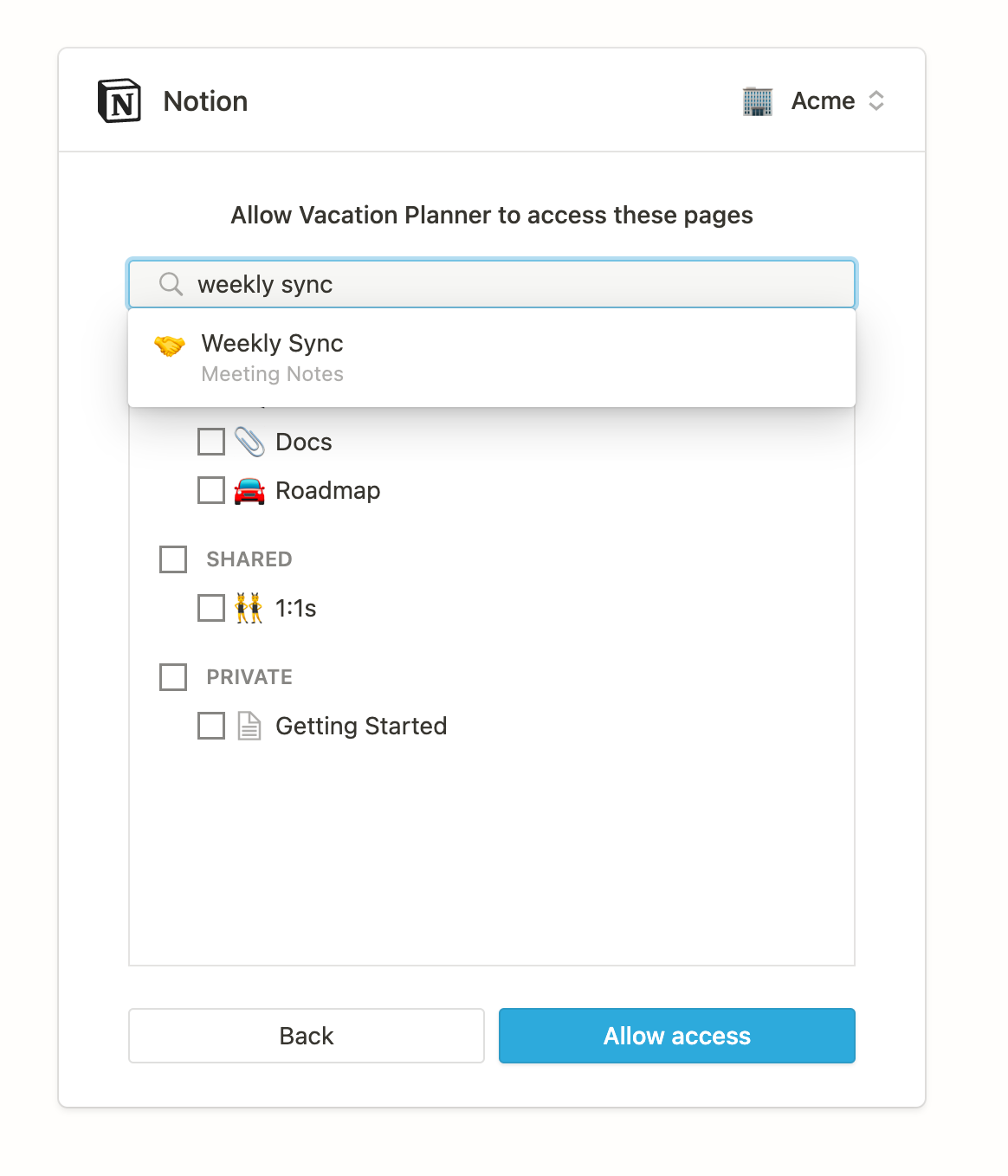
The search bar now lets you search for and select nested pages to share with an integration.
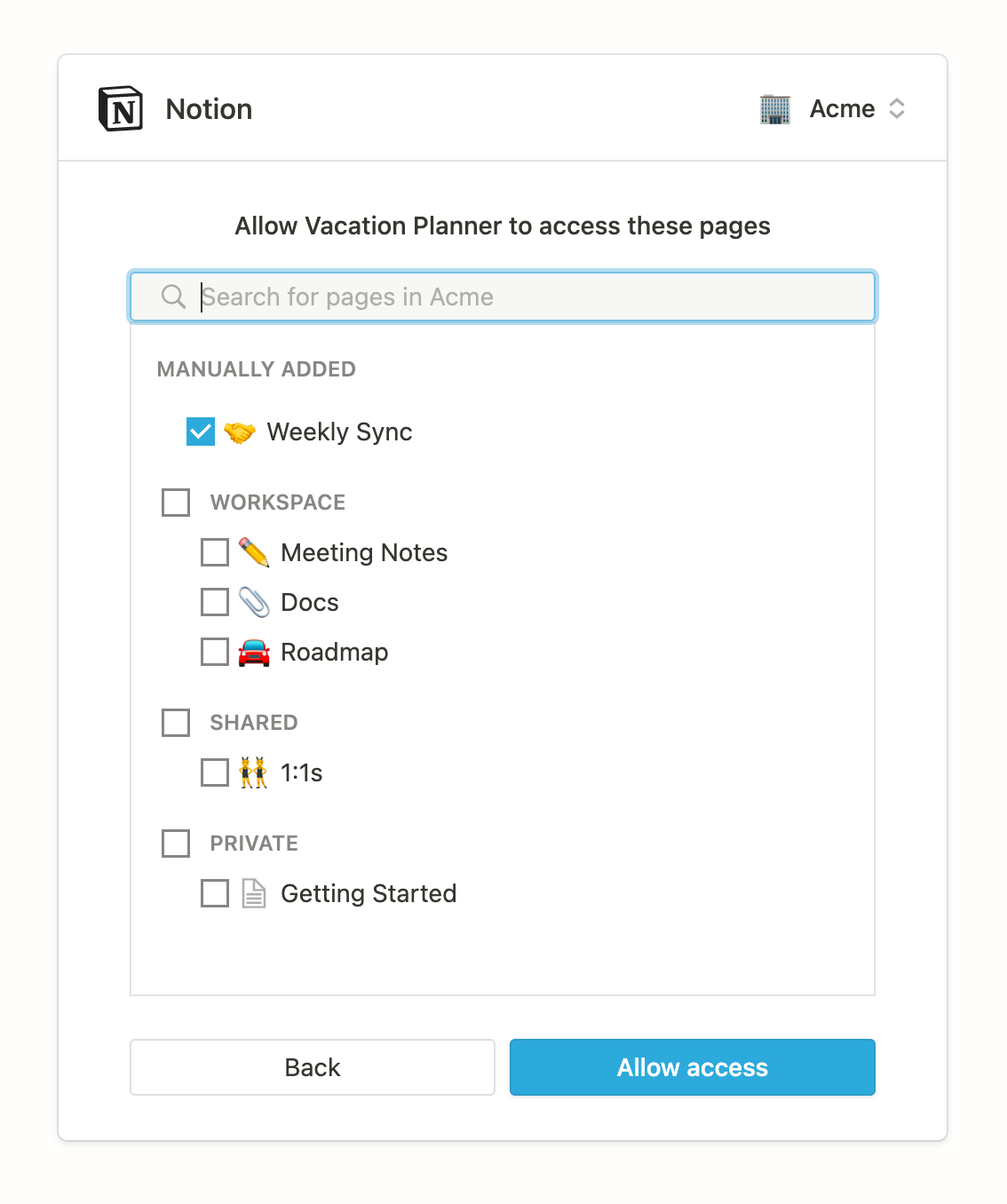
Once selected, any nested pages appear in the "Manually Added" section.
Database property objects now include the property name
Database property objects now include the fieldname with the property name as it appears in Notion.Rollup property functions now include show_original
Thefunction show_original has now been added to rollup database property objects. This fixes a bug where rollup properties were omitted if the calculation was “Show Original”.Create new databases with POST /v1/databases
You can now use the Notion API to create a database as a subpage of an existing page. Currently supported property types are"title", "rich_text", "number", "select", "multi_select", "date", "people", "files", "checkbox", "url", "email", "phone_number", "created_time", "created_by", "last_edited_time", "last_edited_by".Example request
Example response
User mentions can only be of people
To be consistent with the Notion application, only users of type “people” can be mentioned in rich text objects or in people properties of databases. Trying to include users of type “bot” will return a validation error. Existing mentions of bot users is unaffected.Page objects now contain url
Page objects now return the web address of the page in theurl key.Last edited and created time properties are now rounded to the nearest minute
Starting July 1st, thelast_edited_time and created_time properties will be rounded down to the closest minute for page, database , and block objects. Previously, this behavior was inconsistent with some times being rounded and others not.Database objects now return parent
Database objects now return a parent property. Databases can have pages or workspaces as parents.Other Improvements and Fixes
- Inline database mentions are now included in rich_text mention responses.
- When an integration does not have access to a page or database mention, we will no longer completely omit the mention. The mention will be returned with just the ID but without detailed information (title will appear as “Untitled” and annotations will be default).
- When integrations are added to pages inside collections they can now always update page properties, even when the integration does not have access to the parent database. However, integrations will not be able to add new select or multi-select properties through the create or update page endpoints without the ability to edit the database parent.
Select values can now be dynamically created via Create and Update Page endpoints + other updates since public beta launch
You can now dynamically create new options for Select or Multi-Select properties when using the Create Page and Update Page endpoints. When specifying an option that does not exist in the database schema already, the option will now be created and the database schema updated accordingly.- The title property of a page can be set, and a page can be archived or un-archived, even when the page does not belong to a database.
- Retrieving pages that are shared with an integration, but where the page’s parent is not shared, no longer erroneously returns a 404.
- Search endpoint now returns untitled pages.
- Applies to version 2021-05-13 and later only: The Query Database endpoint no longer accepts query parameters – these should be sent as body parameters.
”Notion-Version” header will be required starting June 1, 2021
The Notion API has recommended using an explicit version to every HTTP request, using theNotion-Version header. For integrations created after June 1, 2021 an explicit version on every request will become required. After July 1, 2021, integrations created before June 1, 2021 will also have the same requirement. Today, the most recent version is "2021-05-13".Is my integration affected? What should I do to update?
This requirement will not break your existing integration; however, we will start enforcing this requirement for all API requests on July 1st. Starting July 1st, if you don’t send the Notion-Version header with your Notion API calls, you will get a"missing_version" error. Learn more about how the Notion API handles versioning.If you’ve been using examples copied from documentation or example code since the public beta, including using the Notion SDK for JavaScript, your existing code should continue to work as expected.Otherwise, please make one of the two following changes before July 1:- Add
Notion-Version: 2021-05-11in the header when making requests (no other code change is needed). - Recommended: Add
Notion-Version: 2021-05-13in the header when making requests. Making this change will move you to our newest version which includes the following breaking change.
Breaking changes in version 2021-05-13
The type of property value objects for rich text properties has changed from "text" to "rich_text".When creating pages and updating page properties, update page property values that are rich text to use the key rich_text instead of text. Similarly when retrieving a page, rich text properties will be returned with the type "rich_text" instead of "text".This change helps distinguish between the property type, and the inner text values of rich text object, which have the key text.To illustrate this change, here is an example of how the page object’s properties appear before and after: