> ## Documentation Index
> Fetch the complete documentation index at: https://developers.notion.com/llms.txt
> Use this file to discover all available pages before exploring further.
# null
**Deprecated as of version 2025-09-03**
This page describes the API for versions up to and including `2022-06-28`. In the new `2025-09-03` version, the concepts of databases and data sources were split up, as described in [Upgrading to 2025-09-03](/guides/get-started/upgrade-guide-2025-09-03).
Refer to the new APIs instead:
* [Query a data source](/reference/query-a-data-source)
Gets a list of [Pages](/reference/page) and/or [Databases](/reference/database) contained in the database, filtered and ordered according to the filter conditions and sort criteria provided in the request. The response may contain fewer than `page_size` of results. If the response includes a `next_cursor` value, refer to the [pagination reference](/reference/intro#pagination) for details about how to use a cursor to iterate through the list.
[Wiki](https://www.notion.so/help/wikis-and-verified-pages) databases can contain both pages and databases as children.
[**Filters**](/reference/post-database-query-filter) are similar to the [filters provided in the Notion UI](https://www.notion.so/help/views-filters-and-sorts) where the set of filters and filter groups chained by "And" in the UI is equivalent to having each filter in the array of the compound `"and"` filter. Similar a set of filters chained by "Or" in the UI would be represented as filters in the array of the `"or"` compound filter.
Filters operate on database properties and can be combined. If no filter is provided, all the pages in the database will be returned with pagination.
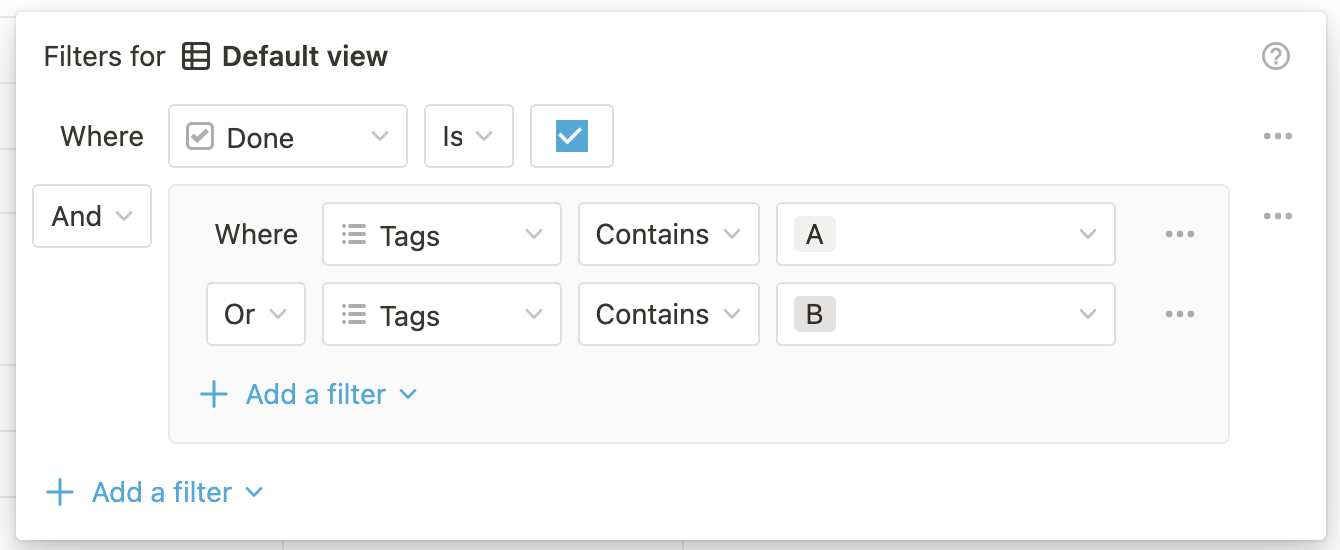 ```json Filter Object theme={null}
{
"and": [
{
"property": "Done",
"checkbox": {
"equals": true
}
},
{
"or": [
{
"property": "Tags",
"contains": "A"
},
{
"property": "Tags",
"contains": "B"
}
]
}
]
}
```
In addition to chained filters, databases can be queried with single filters.
```json theme={null}
{
"property": "Done",
"checkbox": {
"equals": true
}
}
```
[**Sorts**](/reference/post-database-query-sort) are similar to the [sorts provided in the Notion UI](https://notion.so/notion/Intro-to-databases-fd8cd2d212f74c50954c11086d85997e#0eb303043b1742468e5aff2f3f670505). Sorts operate on database properties or page timestamps and can be combined. The order of the sorts in the request matter, with earlier sorts taking precedence over later ones.
The properties of the database schema returned in the response body can be filtered with the `filter_properties` query parameter.
```bash theme={null}
https://api.notion.com/v1/databases/[database_id]/query?filter_properties=[property_id_1]
```
Multiple filter properties can be provided by chaining the `filter_properties` query param.
```bash theme={null}
https://api.notion.com/v1/databases/[database_id]/query?filter_properties=[property_id_1]&filter_properties=[property_id_2]
```
Property IDs can be determined with the [Retrieve a database](/reference/retrieve-a-database) endpoint.
If you are using the [Notion JavaScript SDK](https://github.com/makenotion/notion-sdk-js), the `filter_properties` endpoint expects an array of property ID strings.
```javascript JavaScript theme={null}
notion.databases.query({
database_id: id,
filter_properties: ["propertyID1", "propertyID2"]
})
```
**Permissions**
Before an integration can query a database, the database must be shared with the integration. Attempting to query a database that has not been shared will return an HTTP response with a 404 status code.
To share a database with an integration, click the ••• menu at the top right of a database page, scroll to `Add connections`, and use the search bar to find and select the integration from the dropdown list.
**Integration capabilities**
This endpoint requires an integration to have read content capabilities. Attempting to call this API without read content capabilities will return an HTTP response with a 403 status code. For more information on integration capabilities, see the [capabilities guide](/reference/capabilities).
**To display the page titles of related pages rather than just the ID:**
1. Add a rollup property to the database which uses a formula to get the related page's title. This works well if you have access to updating the database's schema.
2. Otherwise, [retrieve the individual related pages](/reference/retrieve-a-page) using each page ID.
**Formula and Rollup Limitation**
* If a formula depends on a page property that is a relation, and that relation has more than 25 references, only 25 will be evaluated as part of the formula.
* Rollups and formulas that depend on multiple layers of relations may not return correct results.
### Errors
Returns a 404 HTTP response if the database doesn't exist, or if the integration doesn't have access to the database.
Returns a 400 or a 429 HTTP response if the request exceeds the [request limits](/reference/request-limits).
*Note: Each Public API endpoint can return several possible error codes. See the [Error codes section](/reference/status-codes#error-codes) of the Status codes documentation for more information.*
```json Filter Object theme={null}
{
"and": [
{
"property": "Done",
"checkbox": {
"equals": true
}
},
{
"or": [
{
"property": "Tags",
"contains": "A"
},
{
"property": "Tags",
"contains": "B"
}
]
}
]
}
```
In addition to chained filters, databases can be queried with single filters.
```json theme={null}
{
"property": "Done",
"checkbox": {
"equals": true
}
}
```
[**Sorts**](/reference/post-database-query-sort) are similar to the [sorts provided in the Notion UI](https://notion.so/notion/Intro-to-databases-fd8cd2d212f74c50954c11086d85997e#0eb303043b1742468e5aff2f3f670505). Sorts operate on database properties or page timestamps and can be combined. The order of the sorts in the request matter, with earlier sorts taking precedence over later ones.
The properties of the database schema returned in the response body can be filtered with the `filter_properties` query parameter.
```bash theme={null}
https://api.notion.com/v1/databases/[database_id]/query?filter_properties=[property_id_1]
```
Multiple filter properties can be provided by chaining the `filter_properties` query param.
```bash theme={null}
https://api.notion.com/v1/databases/[database_id]/query?filter_properties=[property_id_1]&filter_properties=[property_id_2]
```
Property IDs can be determined with the [Retrieve a database](/reference/retrieve-a-database) endpoint.
If you are using the [Notion JavaScript SDK](https://github.com/makenotion/notion-sdk-js), the `filter_properties` endpoint expects an array of property ID strings.
```javascript JavaScript theme={null}
notion.databases.query({
database_id: id,
filter_properties: ["propertyID1", "propertyID2"]
})
```
**Permissions**
Before an integration can query a database, the database must be shared with the integration. Attempting to query a database that has not been shared will return an HTTP response with a 404 status code.
To share a database with an integration, click the ••• menu at the top right of a database page, scroll to `Add connections`, and use the search bar to find and select the integration from the dropdown list.
**Integration capabilities**
This endpoint requires an integration to have read content capabilities. Attempting to call this API without read content capabilities will return an HTTP response with a 403 status code. For more information on integration capabilities, see the [capabilities guide](/reference/capabilities).
**To display the page titles of related pages rather than just the ID:**
1. Add a rollup property to the database which uses a formula to get the related page's title. This works well if you have access to updating the database's schema.
2. Otherwise, [retrieve the individual related pages](/reference/retrieve-a-page) using each page ID.
**Formula and Rollup Limitation**
* If a formula depends on a page property that is a relation, and that relation has more than 25 references, only 25 will be evaluated as part of the formula.
* Rollups and formulas that depend on multiple layers of relations may not return correct results.
### Errors
Returns a 404 HTTP response if the database doesn't exist, or if the integration doesn't have access to the database.
Returns a 400 or a 429 HTTP response if the request exceeds the [request limits](/reference/request-limits).
*Note: Each Public API endpoint can return several possible error codes. See the [Error codes section](/reference/status-codes#error-codes) of the Status codes documentation for more information.*