> ## Documentation Index
> Fetch the complete documentation index at: https://developers.notion.com/llms.txt
> Use this file to discover all available pages before exploring further.
# Integration capabilities
> Learn about the capabilities that control what an integration can do and see in a Notion workspace.
export const integrationsDashboardUrl = "https://www.notion.so/profile/integrations";
All integrations have associated capabilities which enforce what an integration can do and see in a Notion workspace.
These capabilities when put together enforce which API endpoints an integration can call, and what content and user related information they are able to see.
To set your integration's capabilities see the [Authorization](/guides/get-started/authorization) guide or navigate to the integrations dashboard.
 **If an integration is added to a page, then the integration can access the page’s children**
When an integration receives access to a Notion page or database, it can read and write to both that resource and its children.
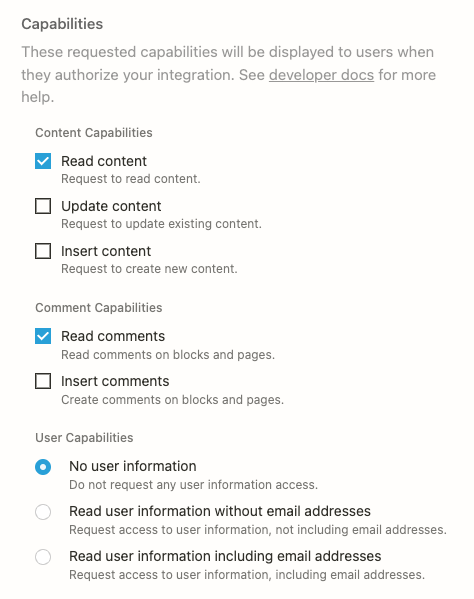
## Content capabilities
Content capabilities affect how an integration can interact with [database objects](/reference/database), [page objects](/reference/page), and [block objects](/reference/block) via the API. Additionally, these capabilities affect what information is exposed to an integration in API responses. To verify which capabilities are needed for an endpoint's desired behavior, please use the API references.
* **Read content**: This capability gives an integration access to read existing content in a Notion workspace. For example, an integration with only this capability is able to call [Retrieve a database](/reference/retrieve-a-database) , but not [Update database](/reference/update-a-database).
* **Update content**: This capability gives an integration permission to update existing content in a Notion workspace. For example, an integration with only this capability is able to call the [Update page](/reference/patch-page) endpoint, but is not able to create new pages.
* **Insert content**: This capability gives an integration permission to create new content in a Notion workspace. This capability does not give the integration access to read full objects. For example an integration with only this capability is able to [Create a page](/reference/post-page) but is not able to update existing pages.
*It is possible for an integration to have any combination of these content capabilities.*
## Comment capabilities
Comment capabilities dictate how an integration can interact with the [comments](/reference/comment-object) on a page or block.
* **Read comments**: This capability gives the integration permission to [read comments](/reference/list-comments) from a Notion page or block.
* **Insert comments**: This capability gives the integration permission to [insert comments](/reference/create-a-comment) in a page or in an existing discussion.
## User capabilities
An integration can request different levels of user capabilities, which affect how [user objects](/reference/user) are returned from the Notion API:
* **No user information**: Selecting this option prevents an integration from requesting any information about users. User objects will not include any information about the user, including name, profile image, or their email address.
* **User information without email addresses**: Selecting this option ensures that User objects will include all information about a user, including name and profile image, but omit the email address.
* **User information with email addresses**: Selecting this option ensures that User objects will include all information about the user, including name, profile image, and their email address.
## Capability Behaviors and Best Practices
An integration's capabilities will never supersede a user's. If a user loses edit access to the page where they have added an integration, that integration will now also only have read access, regardless of the capabilities the integration was created with.
For public integrations, users will need to re-authenticate with an integration if the capabilities are changed in the time since the user last authenticated with the integration.
To learn more about setting your integration's capabilities refer to the [Authorization](/guides/get-started/authorization) guide.
In general, you want to request minimum capabilities that your integration needs in order to function. The fewer capabilities you request, the more likely a workspace admin will be able to install your integration.
For example:
* If your integration is solely bringing data into Notion (creating new pages, or adding blocks), your integration only needs **Insert content** capabilities.
* If your integration is reading data to export it out of Notion, your integration will only need **Read content** capabilities.
* If your integration is simply updating a property on a page or an existing block, your integration will only need **Update content** capabilities.
Built with [Mintlify](https://mintlify.com).
**If an integration is added to a page, then the integration can access the page’s children**
When an integration receives access to a Notion page or database, it can read and write to both that resource and its children.
## Content capabilities
Content capabilities affect how an integration can interact with [database objects](/reference/database), [page objects](/reference/page), and [block objects](/reference/block) via the API. Additionally, these capabilities affect what information is exposed to an integration in API responses. To verify which capabilities are needed for an endpoint's desired behavior, please use the API references.
* **Read content**: This capability gives an integration access to read existing content in a Notion workspace. For example, an integration with only this capability is able to call [Retrieve a database](/reference/retrieve-a-database) , but not [Update database](/reference/update-a-database).
* **Update content**: This capability gives an integration permission to update existing content in a Notion workspace. For example, an integration with only this capability is able to call the [Update page](/reference/patch-page) endpoint, but is not able to create new pages.
* **Insert content**: This capability gives an integration permission to create new content in a Notion workspace. This capability does not give the integration access to read full objects. For example an integration with only this capability is able to [Create a page](/reference/post-page) but is not able to update existing pages.
*It is possible for an integration to have any combination of these content capabilities.*
## Comment capabilities
Comment capabilities dictate how an integration can interact with the [comments](/reference/comment-object) on a page or block.
* **Read comments**: This capability gives the integration permission to [read comments](/reference/list-comments) from a Notion page or block.
* **Insert comments**: This capability gives the integration permission to [insert comments](/reference/create-a-comment) in a page or in an existing discussion.
## User capabilities
An integration can request different levels of user capabilities, which affect how [user objects](/reference/user) are returned from the Notion API:
* **No user information**: Selecting this option prevents an integration from requesting any information about users. User objects will not include any information about the user, including name, profile image, or their email address.
* **User information without email addresses**: Selecting this option ensures that User objects will include all information about a user, including name and profile image, but omit the email address.
* **User information with email addresses**: Selecting this option ensures that User objects will include all information about the user, including name, profile image, and their email address.
## Capability Behaviors and Best Practices
An integration's capabilities will never supersede a user's. If a user loses edit access to the page where they have added an integration, that integration will now also only have read access, regardless of the capabilities the integration was created with.
For public integrations, users will need to re-authenticate with an integration if the capabilities are changed in the time since the user last authenticated with the integration.
To learn more about setting your integration's capabilities refer to the [Authorization](/guides/get-started/authorization) guide.
In general, you want to request minimum capabilities that your integration needs in order to function. The fewer capabilities you request, the more likely a workspace admin will be able to install your integration.
For example:
* If your integration is solely bringing data into Notion (creating new pages, or adding blocks), your integration only needs **Insert content** capabilities.
* If your integration is reading data to export it out of Notion, your integration will only need **Read content** capabilities.
* If your integration is simply updating a property on a page or an existing block, your integration will only need **Update content** capabilities.
Built with [Mintlify](https://mintlify.com).