> ## Documentation Index
> Fetch the complete documentation index at: https://developers.notion.com/llms.txt
> Use this file to discover all available pages before exploring further.
# Link Previews API
 Link Previews unfurl authenticated content in Notion when users paste supported links from selected partner services.
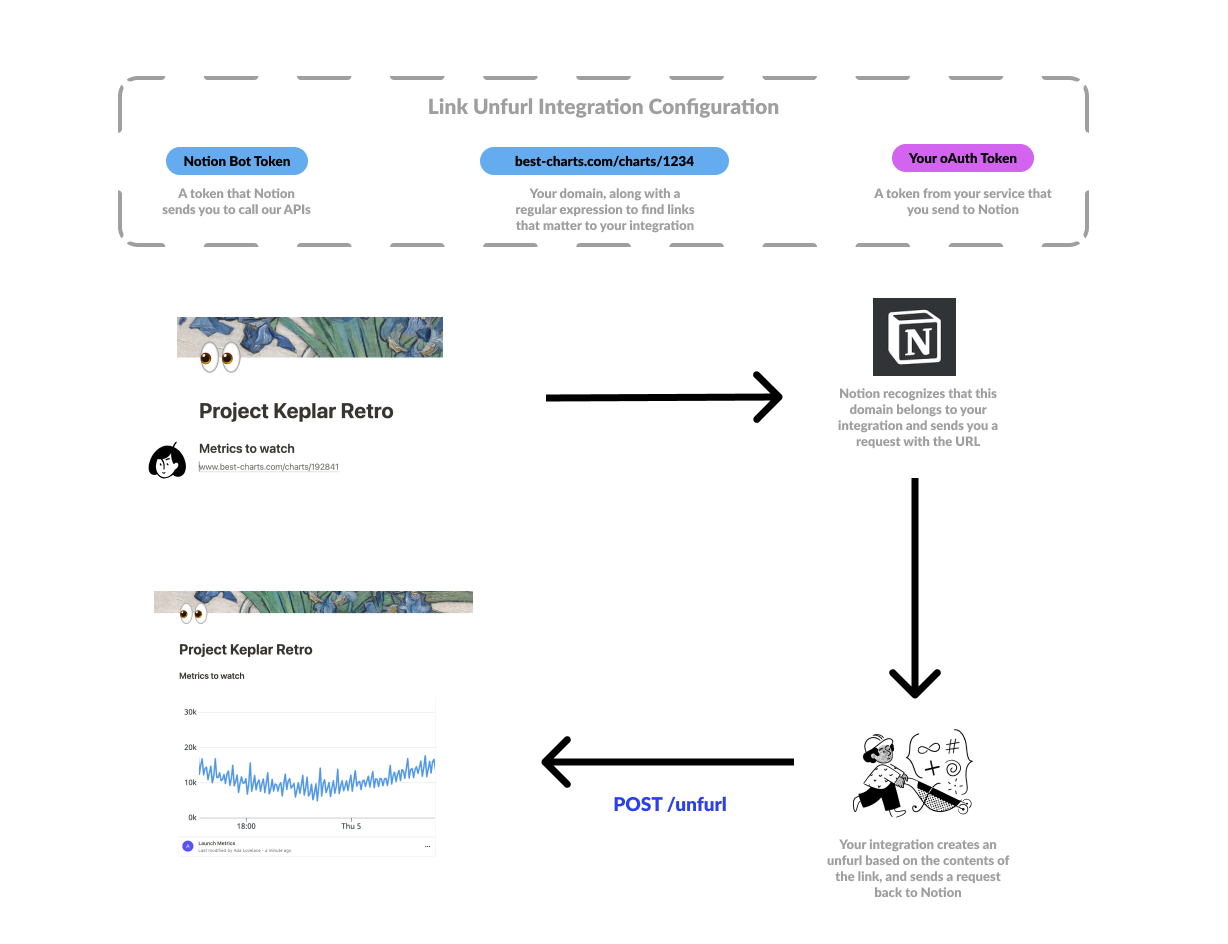
When a user pastes a supported link, Notion can ask the user to authenticate with the source service. The service can then unfurl content in a link preview block, which can include text, statuses, iFrames, and media.
Link Previews unfurl authenticated content in Notion when users paste supported links from selected partner services.
When a user pastes a supported link, Notion can ask the user to authenticate with the source service. The service can then unfurl content in a link preview block, which can include text, statuses, iFrames, and media.
 ## Availability
Custom Link Preview connections are no longer available for new developers to create. Existing supported Link Preview integrations continue to work for Notion users.
## Availability
Custom Link Preview connections are no longer available for new developers to create. Existing supported Link Preview integrations continue to work for Notion users.