> ## Documentation Index
> Fetch the complete documentation index at: https://developers.notion.com/llms.txt
> Use this file to discover all available pages before exploring further.
# Introduction
> Learn how link previews work in Notion.
A Link Preview is a real-time excerpt of authenticated content that unfurls in Notion when an authenticated user shares an enabled link. Instead of logging in to multiple tools at a time, collaborators can use Link Previews to centralize their work in Notion.
Notion supports Link Previews for selected partner services. For example:
* **Trello** links can unfurl information about a linked task.
* **Figma** links can share a linked board’s image preview and corresponding metadata.
* **Amplitude** links can share a linked graph in an iFrame along with an interface to modify the graph.
* **Slack** links can unfurl a linked message’s content and author.
## How Link Previews work
A user shares a Link Preview enabled URL. Notion detects supported URLs based on the Link Preview connection settings for that service. If it’s the first time that a user has shared a supported URL, then Notion kicks off an auth flow to authenticate with the source service. After the user authenticates, Notion and the source service exchange tokens that allow Notion to show a Link Preview in the user’s workspace.
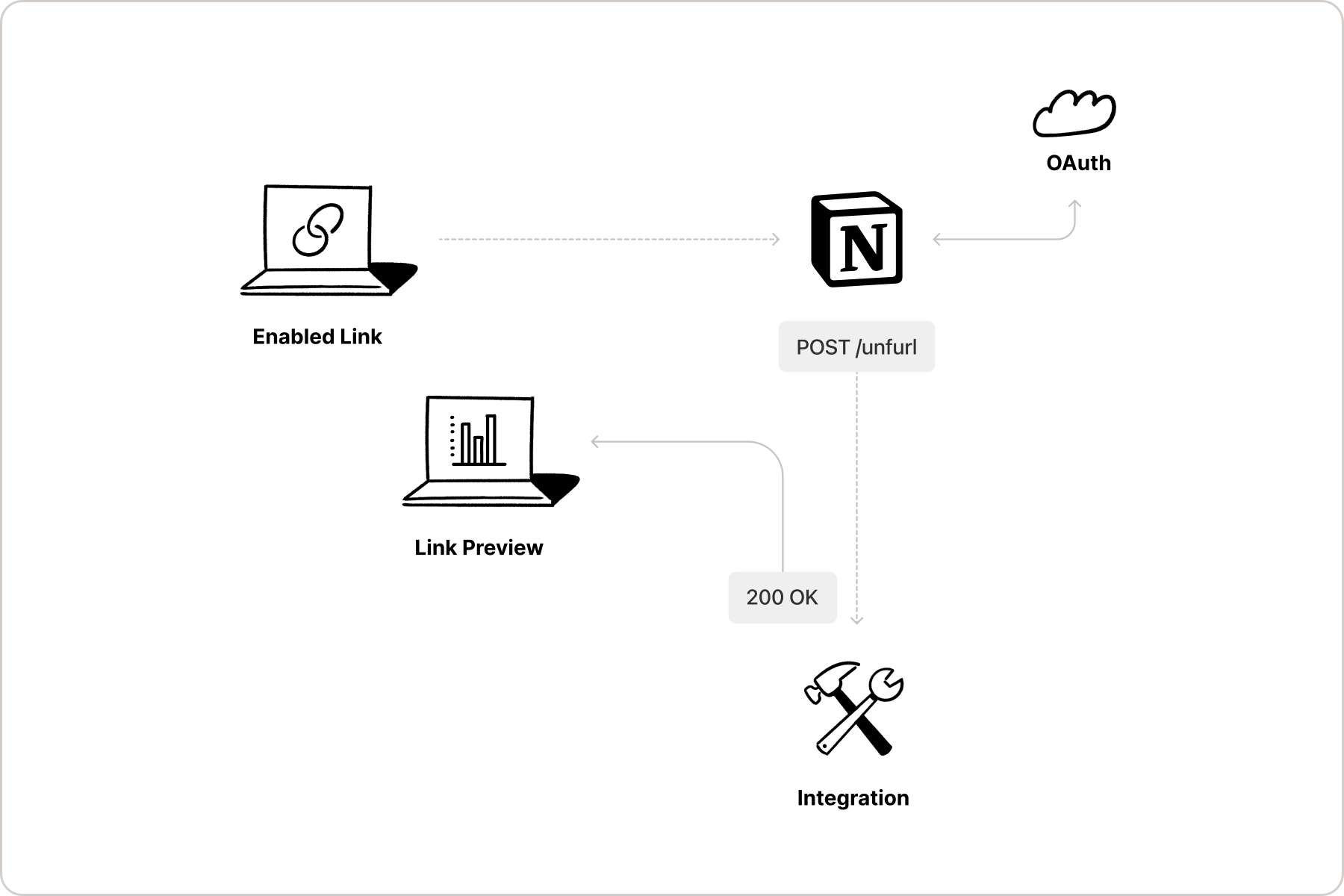 The source service also detects any changes to the data embedded in the Link Preview and alerts Notion when the Link Preview needs to be updated.
Notion alerts the source service when a Link Preview is deleted, so that the service can stop listening for updates.
## Link Previews vs. Embed blocks
If you have used [Embed blocks](/reference/block#embed) in Notion’s UI before, you may be wondering how Link Previews differ from them. Embeds allow Notion users to embed online content, such as a webpage, PDF, and more, directly in a Notion page. This allows users to preview the content without leaving Notion.
Link Previews are similar, but they display authenticated, structured content from a supported service. Rather than embedding the full content of a webpage or file being shared, Link Previews pull data from a linked page and display it in an unfurled format.
Since Link preview connections require [OAuth 2.0](https://www.oauth.com/) authentication, unfurled link content will update as the data being shared updates. For example, if a GitHub pull request is shared as a Link Preview, the data displayed in the preview will update as the pull request updates (e.g. when it is merged).
To learn more about Embed blocks, read our [reference docs](/reference/block#embed) and [Help Centre guide](https://www.notion.so/help/embed-and-connect-other-apps).
To learn more about Link Previews, see the following resources:
* [API reference docs for the Link Preview unfurl attribute object](/reference/unfurl-attribute-object)
* [Help Centre](https://www.notion.so/help/guides/notion-api-link-previews-feature) guide
The source service also detects any changes to the data embedded in the Link Preview and alerts Notion when the Link Preview needs to be updated.
Notion alerts the source service when a Link Preview is deleted, so that the service can stop listening for updates.
## Link Previews vs. Embed blocks
If you have used [Embed blocks](/reference/block#embed) in Notion’s UI before, you may be wondering how Link Previews differ from them. Embeds allow Notion users to embed online content, such as a webpage, PDF, and more, directly in a Notion page. This allows users to preview the content without leaving Notion.
Link Previews are similar, but they display authenticated, structured content from a supported service. Rather than embedding the full content of a webpage or file being shared, Link Previews pull data from a linked page and display it in an unfurled format.
Since Link preview connections require [OAuth 2.0](https://www.oauth.com/) authentication, unfurled link content will update as the data being shared updates. For example, if a GitHub pull request is shared as a Link Preview, the data displayed in the preview will update as the pull request updates (e.g. when it is merged).
To learn more about Embed blocks, read our [reference docs](/reference/block#embed) and [Help Centre guide](https://www.notion.so/help/embed-and-connect-other-apps).
To learn more about Link Previews, see the following resources:
* [API reference docs for the Link Preview unfurl attribute object](/reference/unfurl-attribute-object)
* [Help Centre](https://www.notion.so/help/guides/notion-api-link-previews-feature) guide