> ## Documentation Index
> Fetch the complete documentation index at: https://developers.notion.com/llms.txt
> Use this file to discover all available pages before exploring further.
# Upgrade guide
> Learn how to upgrade your connections to 2025-09-03.
We’ve released **Notion API version `2025‑09‑03`**, introducing first-class support for multi-source databases. This enables a single database to contain multiple linked data sources — unlocking powerful new workflows.
For more information about data sources, see [our FAQs.](/guides/get-started/upgrade-faqs-2025-09-03)
**However, this change is not backwards-compatible.** Most existing database connections must be updated to prevent disruptions.
**Code changes required**
If your connection is still using a previous API version and a user adds another data source to a database, **the following API actions will fail:**
* Create page when using the database as the parent
* Database read, write, or query
* Writing relation properties that point to that database
## What’s changing
* Most API operations that used `database_id` now require a `data_source_id`
* Several database endpoints have moved or been restructured to support the new data model
## What this guide covers
* A breakdown of what’s new and why it changed
* A step-by-step migration checklist to safely update your connections
## Upgrade checklist
Use this checklist to see exactly what must change before you bump Notion-Version to `2025-09-03`.
### Required steps across all of your connections
Add a discovery step to fetch and store the `data_source_id` to use in subsequent API calls.
Start sending `data_source_id` when creating pages or defining relations
Migrate database endpoints to data sources.
If you use the Search API, update result handling to process data source objects and possible multiple results per database
If using the TypeScript SDK, upgrade to the correct version and set the new version in your client
If using webhooks, handle the new shape and bump your subscription version
**Developer action required**
These steps primarily require code changes in your repositories or low-code platform. They cannot be fully completed through the Notion connection management UI.
## Step-by-step guide
### Step 1: Add a discovery step to fetch and store the `data_source_id`
First, identify the parts of your system that process database IDs. These may include:
* Responses of list and search APIs, e.g. [Search](/reference/post-search).
* Database IDs provided directly by users of your system, or hard-coded based on URLs in the Notion app.
* Events for connection webhooks (covered in the **Webhook changes** section below).
For each entry point that uses database IDs, start your migration process by introducing an API call to the new **Get Database API** (`GET /v1/databases/:database_id`) endpoint to retrieve a list of child `data_sources`. For this new call, make sure to use the `2025-09-03` version in the `Notion-Version` header, even if the rest of your API calls haven't been updated yet.
```json Get Database (JSON) expandable theme={null}
// GET /v1/databases/{database_id}
// Notion-Version: "2025-09-03"
// --- RETURNS -->
{
"object": "database",
"id": "{database_id}",
"title": [/* ... */],
"parent": {
"type": "page_id",
"page_id": "255104cd-477e-808c-b279-d39ab803a7d2"
},
"is_inline": false,
"in_trash": false,
"created_time": "2025-08-07T10:11:07.504-07:00",
"last_edited_time": "2025-08-10T15:53:11.386-07:00",
"data_sources": [
{
"id": "{data_source_id}",
"name": "My Task Tracker"
}
],
"icon": null,
"cover": null,
// ...
}
```
```typescript Get Database (JS SDK) expandable theme={null}
let notion = new Client({
auth: "{ACCESS_TOKEN}",
notionVersion: "2025-09-03",
})
const DATABASE_ID = "/* ... */"
try {
const response = await notion.request({
method: "get",
path: `databases/${DATABASE_ID}`,
})
const dataSources = response.data_sources
// [{ id: "...", name: "..." }, ...]
console.log(dataSources)
// In the existing, single-source database case, there will only
// be one data source.
const dataSource = dataSources[0]
} catch (error) {
// Handle `APIResponseError`
console.error(error)
}
// ... Remaining code, not migrated yet.
notion = new Client({
auth: "{ACCESS_TOKEN}",
notionVersion: "2022-06-28",
})
// ...
```
To get a data source ID in the Notion app, the settings menu for a database includes a "Copy data source ID" button under "Manage data sources":
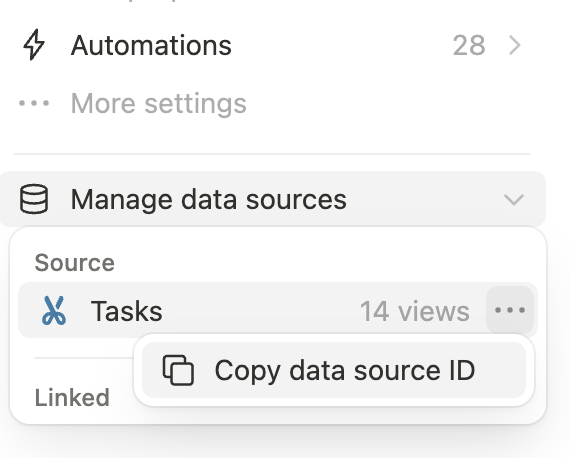 Having access to the data source ID (or rather, *IDs*, once Notion users start adding 2nd sources for their existing databases) for a database lets you continue onto the next few steps.
### Step 2: Provide data source IDs when creating pages or relations
Some APIs that accept `database_id` in the body parameters now support providing a specific `data_source_id` instead. This works for any API version, meaning you can switch over at your convenience, before or after upgrading these API requests to use `2025-09-03`:
* Creating a page with a database (now: data source) parent
* Defining a database relation property that points to another database (now: data source)
#### Create page
In the [Create a page](/reference/post-page) API, look for calls that look like this:
```json Create Page (JSON) theme={null}
// POST /v1/pages
{
"parent": {
"type": "database_id",
"database_id": "..."
}
}
```
```typescript Create Page (TS SDK) theme={null}
const response = await notion.pages.create({
parent: {
type: "database_id",
database_id: DATABASE_ID,
}
})
```
Change these to use `data_source_id` parents instead, using the code from Step 1 to get the ID of a database's data source:
```json Create Page (JSON) theme={null}
// POST /v1/pages
{
"parent": {
"type": "data_source_id",
"data_source_id": "..."
}
}
```
```typescript Create Page (TS SDK) theme={null}
// Get dataSource from Step 1
const response = await notion.request({
method: "post",
path: "pages",
body: {
parent: {
type: "data_source_id",
data_source_id: dataSource.id,
},
}
})
```
#### Create or update database
For [database relation properties](/reference/property-object#relation), the API will include both a `database_id` and `data_source_id` fields in the read path instead of just a `database_id`.
In the write path, switch your connection to only provide the `data_source_id` in request objects.
```json Relation property response example theme={null}
"Projects": {
"id": "~pex",
"name": "Projects",
"type": "relation",
"relation": {
"database_id": "6c4240a9-a3ce-413e-9fd0-8a51a4d0a49b",
"data_source_id": "a42a62ed-9b51-4b98-9dea-ea6d091bc508",
"dual_property": {
"synced_property_name": "Tasks",
"synced_property_id": "JU]K"
}
}
}
```
Note that [database mentions](/reference/rich-text#database-mention-type-object) in rich text will continue to reference the database, not the data source.
### Step 3: Migrate database endpoints to data sources
The next step is to migrate each existing use of database APIs to their new data source equivalents, taking into account the differences between the old `/v1/databases` APIs and new `/v1/data_sources` APIs:
* Return very similar responses, but with `object: "data_source"`, starting from `2025-09-03`
* Accept a specific **data source ID** in query, body, and path parameters, not a database ID
* Exist under the `/v1/data_sources` namespace, starting from version `2025-09-03`
* Require a custom API request with `notion.request` if you're using the TypeScript SDK, since we won't upgrade to SDK v5 until you get to Step 4 (below).
The following APIs are affected. Each of them is covered by a sub-section below, with more specific Before vs. After explanations and code snippets:
#### Retrieve database
**Before (2022-06-28):**
* Retrieving a database with multiple data sources fails with a `validation_error` message.
* **For relation properties**: across *all* API versions, *both* the `database_id` and `data_source_id` are now included in the response object.
```json Retrieve Database (JSON) theme={null}
// GET /v1/databases/:database_id
{
// ...
}
```
```typescript Query Database (TS SDK) theme={null}
const response = await notion.databases.retrieve({
database_id: "...",
// ...
})
```
**After (2025-09-03):**
* The Retrieve Database API is now repurposed to return a list of `data_sources` (each with an `id` and `name`, as described in Step 1).
* The Retrieve *Data Source* API is the new home for getting up-to-date information on the properties (schema) of each data source under a database.
* The `object` field is always `"data_source"` and the `id` is specific to the data source.
* The `parent` object now identifies the `database_id` immediate parent of the data source.
* The database's parent (i.e. the data source's grandparent) is included as a separate field, `database_parent`, on the data source response.
* You can't use a database ID with the retrieve data source API, or vice-versa. The two types of IDs are not interchangeable.
```json Retrieve Data Source (JSON) expandable theme={null}
// Get `data_source_id` from Step 1
//
// GET /v1/data_sources/:data_source_id
{
"object": "data_source",
"id": "bc1211ca-e3f1-4939-ae34-5260b16f627c",
"created_time": "2021-07-08T23:50:00.000Z",
"last_edited_time": "2021-07-08T23:50:00.000Z",
"properties": {
"In stock": {
"id": "fk%5EY",
"name": "In stock",
"type": "checkbox",
"checkbox": {}
},
"Name": {
"id": "title",
"name": "Name",
"type": "title",
"title": {}
}
},
"parent": {
"type": "database_id",
"database_id": "6ee911d9-189c-4844-93e8-260c1438b6e4"
},
"database_parent": {
"type": "page_id",
"page_id": "98ad959b-2b6a-4774-80ee-00246fb0ea9b"
},
// ... (other properties omitted)
}
```
```typescript Retrieve Data Source (TS SDK) expandable theme={null}
// Get dataSource from Step 1
const response = await notion.request({
method: "get",
path: `data_sources/${dataSource.id}`,
// ...
})
// After upgrading TS SDK:
const response = await notion.dataSources.retrieve({
data_source_id: dataSource.id,
})
```
#### Query databases
**Before (2022-06-28):**
```json Query Database (JSON) theme={null}
// PATCH /v1/databases/:database_id/query
{
// ...
}
```
```typescript Query Database (TS SDK) theme={null}
const response = await notion.databases.query({
database_id: "...",
// ...
})
```
**After (2025-09-03):**
When you update the API version, the path of this API changes, and now accepts a data source ID. With the TS SDK, you'll have to switch this to temporarily use a custom `notion.request(...)`, until you upgrade to the next major version as part of Step 4.
```json Query Data Source (JSON) theme={null}
// PATCH /v1/data_sources/:data_source_id/query
{
// ...
}
```
```typescript Query Data Source (TS SDK) theme={null}
// Get dataSource from Step 1
const response = await notion.request({
method: "post",
path: `data_sources/${dataSource.id}/query`,
// ...
})
// After upgrading TS SDK:
const response = await notion.dataSources.query({
data_source_id: dataSource.id,
// ...
})
```
#### Create database
**Before (2022-06-28):**
* In `2022-06-28`, the Create Database API created a database and data source, along with its initial default view.
* **For relation properties**: across *all* API versions, *both* the `database_id` and `data_source_id` are now included in the response object.
* When providing relation properties in a request, you can either use `database_id`, `data_source_id`, or both, prior to making the API version upgrade.
* We recommend starting by switching your connection over to passing only a `data_source_id` for relation objects even in `2022-06-28` to precisely identify the data source to use for the relation and be ready for the `2025-09-03` behavior.
```json Create Database (JSON) theme={null}
// POST /v1/databases
{
"parent": {"type": "page_id", "page_id": "..."},
"properties": {...},
// ...
}
```
```typescript Create Database (TS SDK) theme={null}
const response = await notion.databases.create({
parent: {type: "page_id", page_id: "..."},
properties: {...},
// ...
})
```
**After (2025-09-03):**
* Continue to use the Create Database API even after upgrading, when you want to create both a database and its initial data source.
* `properties` for the initial data source you're creating now go under `initial_data_source[properties]` to better separate data source specific properties vs. ones that apply to the entire database.
* Other parameters apply to the database and continue to be specified at the top-level when creating a database (`icon`, `cover`, `title`).
* Only use the new Create Data Source API to add an additional data source (with a new set of `properties`) to an existing database.
* **For relation properties**: You can no longer provide a `database_id`. Notion continues to include both the `database_id` and `data_source_id` in the *response* for convenience, but the *request* object must **only contain `data_source_id`**.
```typescript Create Database with initial data source (JSON) theme={null}
// POST /v1/databases
{
"initial_data_source": {
"properties": {
// ... (Data source properties behave the same as database properties previously)
}
},
"parent": {"type": "workspace", "workspace": true} | {"type": "page_id", "page_id": "..."},
"title": [...],
"icon": {"type": "emoji", "emoji": "🚀"} | ...
}
```
```typescript Create Database with initial data source (TS SDK) theme={null}
const response = await notion.request({
method: "post",
path: "databases",
body: {
initial_data_source: {
properties: {
// ... (Data source properties behave the same as database properties previously)
}
},
},
parent: {type: "workspace", workspace: true} | {type: "page_id", page_id: "..."},
title: [...],
icon: {type: "emoji", emoji: "🚀"} | ...
}
})
// After upgrading TS SDK:
const response = await notion.databases.create({
data_source_id: dataSource.id,
})
```
#### Update database
**Before (2022-06-28):**
* In `2022-06-28`, the Update Database API was used to update attributes that related to both a database and its data source under the hood. For example, `is_inline` relates to the database, but `properties` defines the schema of a specific data source.
* **For relation properties**: across *all* API versions, *both* the `database_id` and `data_source_id` are now included in the response object.
* When providing relation properties in a request, you can either use `database_id`, `data_source_id`, or both, prior to making the API version upgrade.
* We recommend starting by switching your connection over to passing only a `data_source_id` for relation objects even in `2022-06-28` to precisely identify the data source to use for the relation and be ready for the `2025-09-03` behavior.
```json Update Database (JSON) theme={null}
// PATCH /v1/databases/:database_id
{
"icon": {
"file_upload": {"id": "..."}
},
"properties": {
"Restocked (new)": {
"type": "checkbox",
"checkbox": {}
},
"In stock": null
},
"title": [{"text": {"content": "New Title"}}]
}
```
```typescript Update Database (TS SDK) theme={null}
const response = await notion.databases.update({
database_id: "...",
icon: {file_upload: "..."},
properties: {
"Restocked (new)": {
type: "checkbox",
checkbox: {},
},
"In stock": null,
},
title: [{text: {content: "New Title"}}],
})
```
**After (2025-09-03):**
* Continue to use the Update Database API for attributes that apply to the database: `parent`, `title`, `is_inline`, `icon`, `cover`, `in_trash`.
* `parent` can be used to move an existing database to a different page, or (for public connections), to the workspace level as a private page. This is a new feature in Notion's API.
* `cover` is not supported when `is_inline` is `true`.
* Switch over to the Update *Data Source* API to modify attributes that apply to a specific data source: `properties` (to change database schema), `in_trash` (to archive or unarchive a specific data source under a database), `title`.
* Changes to one data source's `properties` doesn't affect the schema for other data source, even if they share a common database.
* **For relation properties**: You can no longer provide a `database_id`. Notion continues to include both the `database_id` and `data_source_id` in the *response* for convenience, but the *request* object (to Update Data Source) must **only contain `data_source_id`**.
Example for updating a data source's title and properties (adding one new property and removing another):
```json Update Data Source (JSON) theme={null}
// PATCH /v1/data_sources/:data_source_id
{
"properties": {
"Restocked (new)": {
"type": "checkbox",
"checkbox": {}
},
"In stock": null
},
"title": [{"text": {"content": "New Title"}}]
}
```
```typescript Update Data Source (TS SDK) theme={null}
// Update data source properties and title using SDK version
// prior to v5 and setting `notionVersion` in the `Client` to
// "2025-09-03":
const response = await notion.request({
method: "patch",
path: `data_sources/${dataSource.id}`,
data: {
properties: {
"Restocked (new)": {
type: "checkbox",
checkbox: {},
},
"In stock": null
},
},
title: [{text: {content: "New Title"}}],
})
// After upgrading TS SDK to v5:
const response = await notion.dataSources.update({
properties: {
"Restocked (new)": {
type: "checkbox",
checkbox: {},
},
"In stock": null,
},
title: [{text: {content: "New Title"}}],
})
```
Example for updating a database's parent (to move it), and switch it to be inline under the parent page:
```json Update Data Source (JSON) theme={null}
// PATCH /v1/databases/:database_id
{
"parent": {"type": "page_id", "page_id": "NEW-PAGE-ID"},
"is_inline": true
}
```
```typescript Update Data Source (TS SDK) theme={null}
const response = await notion.request({
method: "patch",
path: `databases/${DATABASE_ID}`,
body: {
parent: {type: "page_id", page_id: "NEW-PAGE-ID"},
is_inline: true,
}
})
// After upgrading TS SDK:
const response = await notion.dataSources.update({
parent: {type: "page_id", page_id: "NEW-PAGE-ID"},
is_inline: true,
})
```
### Step 4: Handle search results with data sources
**Before (2022-06-28):**
* If any Notion users add a second data source to a database, existing connections will not see any search results for that database.
**After (2025-09-03):**
* The [Search](/reference/post-search) API now only accepts `filter["value"] = "page" | "data_source"` instead of `"page" | "database"` when providing a `filter["type"] = "object"`. Make sure to update the body parameters accordingly when upgrading to `2025-09-03`.
* Currently, the search behavior remains the same. The provided query is matched against the *database* title, not the *data source* title.
* Similarly, the search API *response* returns data source IDs & objects.
* Aside from the IDs and `object: "data_source"` in these entries, the rest of the object shape of search is unchanged.
* Since results operate at the data source level, they continue to include `properties` (database schema) as before.
* If there are multiple data sources, all of them are included in the search response. Each of them will have a different data source ID.
### Step 5: Upgrade SDK (if applicable)
**Introducing `@notionhq/client` v5.0.0**
v5 of the SDK is now available:
* [NPM link](https://www.npmjs.com/package/@notionhq/client/v/5.0.0)
* [GitHub release link](https://github.com/makenotion/notion-sdk-js/releases/tag/v5.0.0)
If you see an even newer version (e.g. `v5.0.2`) at the time you're following these steps, we recommend upgrading directly to the latest version to unlock more enhancements and bugfixes, making the upgrade smoother.
If you're using [Notion's TypeScript SDK](https://github.com/makenotion/notion-sdk-js), and have completed all of the steps above to rework your usage of Notion's endpoints to fit the `2025-09-03` suite of endpoints manually, we recommend completing the migration by upgrading to the next [major version release](https://github.com/makenotion/notion-sdk-js/releases), v5.0.0, via your `package.json` file (or other version management toolchain.)
The code snippets under Step 3 include the relevant syntax for the new `notion.dataSources.*` and `notion.databases.*` methods to assist in your upgrade. Go through each area where you used a manual `notion.request(...)` call, and switch it over to use one of the dedicated methods. Make sure you're setting the Notion version at initialization time to `2025-09-03`.
Note that the [List databases (deprecated)](/reference/get-databases) endpoint, which has been removed since version `2022-02-22`, is no longer included as of v5 of the SDK.
### Step 6: Upgrade webhooks (if applicable)
#### Introducing webhook versioning
When creating, editing, or viewing an [connection webhook subscription](/reference/webhooks) in Notion's connection settings, there's a new option to set the **API version** that applies to events delivered to your webhook URL:
Having access to the data source ID (or rather, *IDs*, once Notion users start adding 2nd sources for their existing databases) for a database lets you continue onto the next few steps.
### Step 2: Provide data source IDs when creating pages or relations
Some APIs that accept `database_id` in the body parameters now support providing a specific `data_source_id` instead. This works for any API version, meaning you can switch over at your convenience, before or after upgrading these API requests to use `2025-09-03`:
* Creating a page with a database (now: data source) parent
* Defining a database relation property that points to another database (now: data source)
#### Create page
In the [Create a page](/reference/post-page) API, look for calls that look like this:
```json Create Page (JSON) theme={null}
// POST /v1/pages
{
"parent": {
"type": "database_id",
"database_id": "..."
}
}
```
```typescript Create Page (TS SDK) theme={null}
const response = await notion.pages.create({
parent: {
type: "database_id",
database_id: DATABASE_ID,
}
})
```
Change these to use `data_source_id` parents instead, using the code from Step 1 to get the ID of a database's data source:
```json Create Page (JSON) theme={null}
// POST /v1/pages
{
"parent": {
"type": "data_source_id",
"data_source_id": "..."
}
}
```
```typescript Create Page (TS SDK) theme={null}
// Get dataSource from Step 1
const response = await notion.request({
method: "post",
path: "pages",
body: {
parent: {
type: "data_source_id",
data_source_id: dataSource.id,
},
}
})
```
#### Create or update database
For [database relation properties](/reference/property-object#relation), the API will include both a `database_id` and `data_source_id` fields in the read path instead of just a `database_id`.
In the write path, switch your connection to only provide the `data_source_id` in request objects.
```json Relation property response example theme={null}
"Projects": {
"id": "~pex",
"name": "Projects",
"type": "relation",
"relation": {
"database_id": "6c4240a9-a3ce-413e-9fd0-8a51a4d0a49b",
"data_source_id": "a42a62ed-9b51-4b98-9dea-ea6d091bc508",
"dual_property": {
"synced_property_name": "Tasks",
"synced_property_id": "JU]K"
}
}
}
```
Note that [database mentions](/reference/rich-text#database-mention-type-object) in rich text will continue to reference the database, not the data source.
### Step 3: Migrate database endpoints to data sources
The next step is to migrate each existing use of database APIs to their new data source equivalents, taking into account the differences between the old `/v1/databases` APIs and new `/v1/data_sources` APIs:
* Return very similar responses, but with `object: "data_source"`, starting from `2025-09-03`
* Accept a specific **data source ID** in query, body, and path parameters, not a database ID
* Exist under the `/v1/data_sources` namespace, starting from version `2025-09-03`
* Require a custom API request with `notion.request` if you're using the TypeScript SDK, since we won't upgrade to SDK v5 until you get to Step 4 (below).
The following APIs are affected. Each of them is covered by a sub-section below, with more specific Before vs. After explanations and code snippets:
#### Retrieve database
**Before (2022-06-28):**
* Retrieving a database with multiple data sources fails with a `validation_error` message.
* **For relation properties**: across *all* API versions, *both* the `database_id` and `data_source_id` are now included in the response object.
```json Retrieve Database (JSON) theme={null}
// GET /v1/databases/:database_id
{
// ...
}
```
```typescript Query Database (TS SDK) theme={null}
const response = await notion.databases.retrieve({
database_id: "...",
// ...
})
```
**After (2025-09-03):**
* The Retrieve Database API is now repurposed to return a list of `data_sources` (each with an `id` and `name`, as described in Step 1).
* The Retrieve *Data Source* API is the new home for getting up-to-date information on the properties (schema) of each data source under a database.
* The `object` field is always `"data_source"` and the `id` is specific to the data source.
* The `parent` object now identifies the `database_id` immediate parent of the data source.
* The database's parent (i.e. the data source's grandparent) is included as a separate field, `database_parent`, on the data source response.
* You can't use a database ID with the retrieve data source API, or vice-versa. The two types of IDs are not interchangeable.
```json Retrieve Data Source (JSON) expandable theme={null}
// Get `data_source_id` from Step 1
//
// GET /v1/data_sources/:data_source_id
{
"object": "data_source",
"id": "bc1211ca-e3f1-4939-ae34-5260b16f627c",
"created_time": "2021-07-08T23:50:00.000Z",
"last_edited_time": "2021-07-08T23:50:00.000Z",
"properties": {
"In stock": {
"id": "fk%5EY",
"name": "In stock",
"type": "checkbox",
"checkbox": {}
},
"Name": {
"id": "title",
"name": "Name",
"type": "title",
"title": {}
}
},
"parent": {
"type": "database_id",
"database_id": "6ee911d9-189c-4844-93e8-260c1438b6e4"
},
"database_parent": {
"type": "page_id",
"page_id": "98ad959b-2b6a-4774-80ee-00246fb0ea9b"
},
// ... (other properties omitted)
}
```
```typescript Retrieve Data Source (TS SDK) expandable theme={null}
// Get dataSource from Step 1
const response = await notion.request({
method: "get",
path: `data_sources/${dataSource.id}`,
// ...
})
// After upgrading TS SDK:
const response = await notion.dataSources.retrieve({
data_source_id: dataSource.id,
})
```
#### Query databases
**Before (2022-06-28):**
```json Query Database (JSON) theme={null}
// PATCH /v1/databases/:database_id/query
{
// ...
}
```
```typescript Query Database (TS SDK) theme={null}
const response = await notion.databases.query({
database_id: "...",
// ...
})
```
**After (2025-09-03):**
When you update the API version, the path of this API changes, and now accepts a data source ID. With the TS SDK, you'll have to switch this to temporarily use a custom `notion.request(...)`, until you upgrade to the next major version as part of Step 4.
```json Query Data Source (JSON) theme={null}
// PATCH /v1/data_sources/:data_source_id/query
{
// ...
}
```
```typescript Query Data Source (TS SDK) theme={null}
// Get dataSource from Step 1
const response = await notion.request({
method: "post",
path: `data_sources/${dataSource.id}/query`,
// ...
})
// After upgrading TS SDK:
const response = await notion.dataSources.query({
data_source_id: dataSource.id,
// ...
})
```
#### Create database
**Before (2022-06-28):**
* In `2022-06-28`, the Create Database API created a database and data source, along with its initial default view.
* **For relation properties**: across *all* API versions, *both* the `database_id` and `data_source_id` are now included in the response object.
* When providing relation properties in a request, you can either use `database_id`, `data_source_id`, or both, prior to making the API version upgrade.
* We recommend starting by switching your connection over to passing only a `data_source_id` for relation objects even in `2022-06-28` to precisely identify the data source to use for the relation and be ready for the `2025-09-03` behavior.
```json Create Database (JSON) theme={null}
// POST /v1/databases
{
"parent": {"type": "page_id", "page_id": "..."},
"properties": {...},
// ...
}
```
```typescript Create Database (TS SDK) theme={null}
const response = await notion.databases.create({
parent: {type: "page_id", page_id: "..."},
properties: {...},
// ...
})
```
**After (2025-09-03):**
* Continue to use the Create Database API even after upgrading, when you want to create both a database and its initial data source.
* `properties` for the initial data source you're creating now go under `initial_data_source[properties]` to better separate data source specific properties vs. ones that apply to the entire database.
* Other parameters apply to the database and continue to be specified at the top-level when creating a database (`icon`, `cover`, `title`).
* Only use the new Create Data Source API to add an additional data source (with a new set of `properties`) to an existing database.
* **For relation properties**: You can no longer provide a `database_id`. Notion continues to include both the `database_id` and `data_source_id` in the *response* for convenience, but the *request* object must **only contain `data_source_id`**.
```typescript Create Database with initial data source (JSON) theme={null}
// POST /v1/databases
{
"initial_data_source": {
"properties": {
// ... (Data source properties behave the same as database properties previously)
}
},
"parent": {"type": "workspace", "workspace": true} | {"type": "page_id", "page_id": "..."},
"title": [...],
"icon": {"type": "emoji", "emoji": "🚀"} | ...
}
```
```typescript Create Database with initial data source (TS SDK) theme={null}
const response = await notion.request({
method: "post",
path: "databases",
body: {
initial_data_source: {
properties: {
// ... (Data source properties behave the same as database properties previously)
}
},
},
parent: {type: "workspace", workspace: true} | {type: "page_id", page_id: "..."},
title: [...],
icon: {type: "emoji", emoji: "🚀"} | ...
}
})
// After upgrading TS SDK:
const response = await notion.databases.create({
data_source_id: dataSource.id,
})
```
#### Update database
**Before (2022-06-28):**
* In `2022-06-28`, the Update Database API was used to update attributes that related to both a database and its data source under the hood. For example, `is_inline` relates to the database, but `properties` defines the schema of a specific data source.
* **For relation properties**: across *all* API versions, *both* the `database_id` and `data_source_id` are now included in the response object.
* When providing relation properties in a request, you can either use `database_id`, `data_source_id`, or both, prior to making the API version upgrade.
* We recommend starting by switching your connection over to passing only a `data_source_id` for relation objects even in `2022-06-28` to precisely identify the data source to use for the relation and be ready for the `2025-09-03` behavior.
```json Update Database (JSON) theme={null}
// PATCH /v1/databases/:database_id
{
"icon": {
"file_upload": {"id": "..."}
},
"properties": {
"Restocked (new)": {
"type": "checkbox",
"checkbox": {}
},
"In stock": null
},
"title": [{"text": {"content": "New Title"}}]
}
```
```typescript Update Database (TS SDK) theme={null}
const response = await notion.databases.update({
database_id: "...",
icon: {file_upload: "..."},
properties: {
"Restocked (new)": {
type: "checkbox",
checkbox: {},
},
"In stock": null,
},
title: [{text: {content: "New Title"}}],
})
```
**After (2025-09-03):**
* Continue to use the Update Database API for attributes that apply to the database: `parent`, `title`, `is_inline`, `icon`, `cover`, `in_trash`.
* `parent` can be used to move an existing database to a different page, or (for public connections), to the workspace level as a private page. This is a new feature in Notion's API.
* `cover` is not supported when `is_inline` is `true`.
* Switch over to the Update *Data Source* API to modify attributes that apply to a specific data source: `properties` (to change database schema), `in_trash` (to archive or unarchive a specific data source under a database), `title`.
* Changes to one data source's `properties` doesn't affect the schema for other data source, even if they share a common database.
* **For relation properties**: You can no longer provide a `database_id`. Notion continues to include both the `database_id` and `data_source_id` in the *response* for convenience, but the *request* object (to Update Data Source) must **only contain `data_source_id`**.
Example for updating a data source's title and properties (adding one new property and removing another):
```json Update Data Source (JSON) theme={null}
// PATCH /v1/data_sources/:data_source_id
{
"properties": {
"Restocked (new)": {
"type": "checkbox",
"checkbox": {}
},
"In stock": null
},
"title": [{"text": {"content": "New Title"}}]
}
```
```typescript Update Data Source (TS SDK) theme={null}
// Update data source properties and title using SDK version
// prior to v5 and setting `notionVersion` in the `Client` to
// "2025-09-03":
const response = await notion.request({
method: "patch",
path: `data_sources/${dataSource.id}`,
data: {
properties: {
"Restocked (new)": {
type: "checkbox",
checkbox: {},
},
"In stock": null
},
},
title: [{text: {content: "New Title"}}],
})
// After upgrading TS SDK to v5:
const response = await notion.dataSources.update({
properties: {
"Restocked (new)": {
type: "checkbox",
checkbox: {},
},
"In stock": null,
},
title: [{text: {content: "New Title"}}],
})
```
Example for updating a database's parent (to move it), and switch it to be inline under the parent page:
```json Update Data Source (JSON) theme={null}
// PATCH /v1/databases/:database_id
{
"parent": {"type": "page_id", "page_id": "NEW-PAGE-ID"},
"is_inline": true
}
```
```typescript Update Data Source (TS SDK) theme={null}
const response = await notion.request({
method: "patch",
path: `databases/${DATABASE_ID}`,
body: {
parent: {type: "page_id", page_id: "NEW-PAGE-ID"},
is_inline: true,
}
})
// After upgrading TS SDK:
const response = await notion.dataSources.update({
parent: {type: "page_id", page_id: "NEW-PAGE-ID"},
is_inline: true,
})
```
### Step 4: Handle search results with data sources
**Before (2022-06-28):**
* If any Notion users add a second data source to a database, existing connections will not see any search results for that database.
**After (2025-09-03):**
* The [Search](/reference/post-search) API now only accepts `filter["value"] = "page" | "data_source"` instead of `"page" | "database"` when providing a `filter["type"] = "object"`. Make sure to update the body parameters accordingly when upgrading to `2025-09-03`.
* Currently, the search behavior remains the same. The provided query is matched against the *database* title, not the *data source* title.
* Similarly, the search API *response* returns data source IDs & objects.
* Aside from the IDs and `object: "data_source"` in these entries, the rest of the object shape of search is unchanged.
* Since results operate at the data source level, they continue to include `properties` (database schema) as before.
* If there are multiple data sources, all of them are included in the search response. Each of them will have a different data source ID.
### Step 5: Upgrade SDK (if applicable)
**Introducing `@notionhq/client` v5.0.0**
v5 of the SDK is now available:
* [NPM link](https://www.npmjs.com/package/@notionhq/client/v/5.0.0)
* [GitHub release link](https://github.com/makenotion/notion-sdk-js/releases/tag/v5.0.0)
If you see an even newer version (e.g. `v5.0.2`) at the time you're following these steps, we recommend upgrading directly to the latest version to unlock more enhancements and bugfixes, making the upgrade smoother.
If you're using [Notion's TypeScript SDK](https://github.com/makenotion/notion-sdk-js), and have completed all of the steps above to rework your usage of Notion's endpoints to fit the `2025-09-03` suite of endpoints manually, we recommend completing the migration by upgrading to the next [major version release](https://github.com/makenotion/notion-sdk-js/releases), v5.0.0, via your `package.json` file (or other version management toolchain.)
The code snippets under Step 3 include the relevant syntax for the new `notion.dataSources.*` and `notion.databases.*` methods to assist in your upgrade. Go through each area where you used a manual `notion.request(...)` call, and switch it over to use one of the dedicated methods. Make sure you're setting the Notion version at initialization time to `2025-09-03`.
Note that the [List databases (deprecated)](/reference/get-databases) endpoint, which has been removed since version `2022-02-22`, is no longer included as of v5 of the SDK.
### Step 6: Upgrade webhooks (if applicable)
#### Introducing webhook versioning
When creating, editing, or viewing an [connection webhook subscription](/reference/webhooks) in Notion's connection settings, there's a new option to set the **API version** that applies to events delivered to your webhook URL:
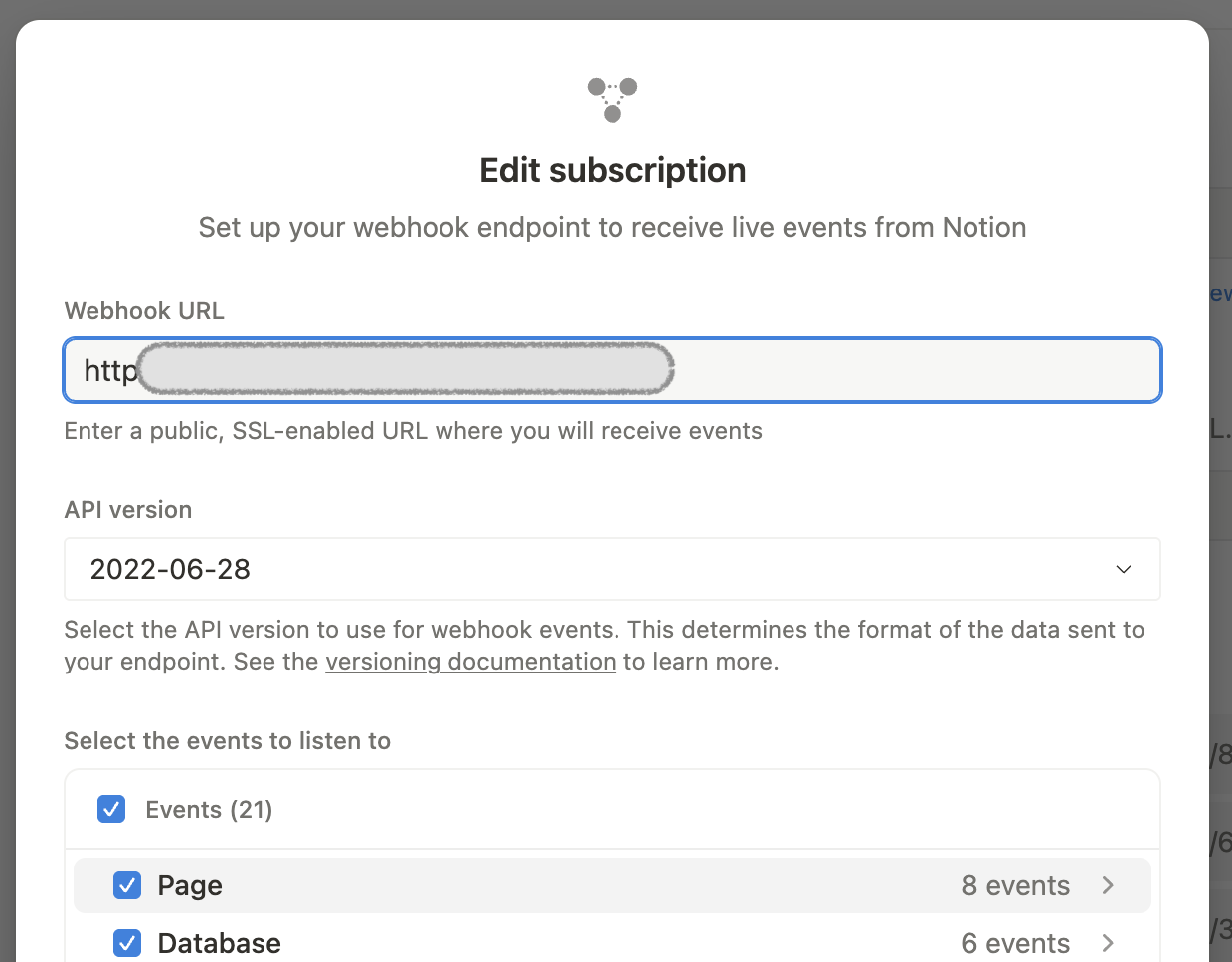 For new webhook endpoints, we recommend starting with the most recent version. For existing webhook subscriptions, you'll need to carefully introduce support for the added and changed webhook types. Ensure your webhook handler can accept *both* old & new event payloads before using the "**Edit subscription**" form to upgrade to the `2025-09-03` API version.
After you've tested your webhook endpoint to ensure the new events are being handled correctly for some period of time (for example, a few hours), you can clean up your system to only expect events with the updated shape. Read on below for specific details on what's changed in `2025-09-03`.
#### New and modified event types
New `data_source` specific events have been added, and the corresponding existing `database` events now apply at the **database** level.
Here's a breakdown of how [event types](/reference/webhooks-events-delivery) change names or behavior when upgraded to `2025-09-03`:
| Old Name | New Name | Description |
| :------------------------- | :---------------------------- | :-------------------------------------------------------------------------------- |
| `database.content_updated` | `data_source.content_updated` | Data source's content updates |
| `database.schema_updated` | `data_source.schema_updated` | Data source's schema updates |
| N/A (new event) | `data_source.created` | New data source is added to an existing database `entity.type` is `"data_source"` |
| N/A (new event) | `data_source.moved` | Data source is moved to a different database `entity.type` is `"data_source"` |
| N/A (new event) | `data_source.deleted` | Data source is deleted from a database `entity.type` is `"data_source"` |
| N/A (new event) | `data_source.undeleted` | Data source is undeleted `entity.type` is `"data_source"` |
| `database.created` | (unchanged) | New database is created with a default data source |
| `database.moved` | (unchanged) | Database is moved to different parent (i.e. page) |
| `database.deleted` | (unchanged) | Database is deleted from its parent |
| `database.undeleted` | (unchanged) | Database is undeleted |
#### Updates to parent data
With the `2025-09-03` version, all webhooks for entities that can have data sources as parents now include a new field `data_source_id` under the `data.parent` object.
This applies to:
* Page events (`page.*`)
* Data source events (the `data_source.*` ones listed above)
* Database events (`database.*`), but **only** in rarer cases where databases are directly parented by another database (i.e. wikis)
For example, when a Notion user creates a page within a data source using the Notion app, the resulting `page.created` event has the following example shape (note the new `data.parent.data_source_id` field):
```json json expandable theme={null}
{
"id": "367cba44-b6f3-4c92-81e7-6a2e9659efd4",
"timestamp": "2024-12-05T23:55:34.285Z",
"workspace_id": "13950b26-c203-4f3b-b97d-93ec06319565",
"workspace_name": "Quantify Labs",
"subscription_id": "29d75c0d-5546-4414-8459-7b7a92f1fc4b",
"integration_id": "0ef2e755-4912-8096-91c1-00376a88a5ca",
"type": "page.created",
"authors": [
{
"id": "c7c11cca-1d73-471d-9b6e-bdef51470190",
"type": "person"
}
],
"accessible_by": [
{
"id": "556a1abf-4f08-40c6-878a-75890d2a88ba",
"type": "person"
},
{
"id": "1edc05f6-2702-81b5-8408-00279347f034",
"type": "bot"
}
],
"attempt_number": 1,
"entity": {
"id": "153104cd-477e-809d-8dc4-ff2d96ae3090",
"type": "page"
},
"data": {
"parent": {
"id": "36cc9195-760f-4fff-a67e-3a46c559b176",
"type": "database",
"data_source_id": "98024f3c-b1d3-4aec-a301-f01e0dacf023"
}
}
}
```
For compatibility with multi-source databases, use the provided `parent.data_source_id` to distinguish which data source the page lives in.
## What’s Next
Read the frequently asked questions for this API change:
For new webhook endpoints, we recommend starting with the most recent version. For existing webhook subscriptions, you'll need to carefully introduce support for the added and changed webhook types. Ensure your webhook handler can accept *both* old & new event payloads before using the "**Edit subscription**" form to upgrade to the `2025-09-03` API version.
After you've tested your webhook endpoint to ensure the new events are being handled correctly for some period of time (for example, a few hours), you can clean up your system to only expect events with the updated shape. Read on below for specific details on what's changed in `2025-09-03`.
#### New and modified event types
New `data_source` specific events have been added, and the corresponding existing `database` events now apply at the **database** level.
Here's a breakdown of how [event types](/reference/webhooks-events-delivery) change names or behavior when upgraded to `2025-09-03`:
| Old Name | New Name | Description |
| :------------------------- | :---------------------------- | :-------------------------------------------------------------------------------- |
| `database.content_updated` | `data_source.content_updated` | Data source's content updates |
| `database.schema_updated` | `data_source.schema_updated` | Data source's schema updates |
| N/A (new event) | `data_source.created` | New data source is added to an existing database `entity.type` is `"data_source"` |
| N/A (new event) | `data_source.moved` | Data source is moved to a different database `entity.type` is `"data_source"` |
| N/A (new event) | `data_source.deleted` | Data source is deleted from a database `entity.type` is `"data_source"` |
| N/A (new event) | `data_source.undeleted` | Data source is undeleted `entity.type` is `"data_source"` |
| `database.created` | (unchanged) | New database is created with a default data source |
| `database.moved` | (unchanged) | Database is moved to different parent (i.e. page) |
| `database.deleted` | (unchanged) | Database is deleted from its parent |
| `database.undeleted` | (unchanged) | Database is undeleted |
#### Updates to parent data
With the `2025-09-03` version, all webhooks for entities that can have data sources as parents now include a new field `data_source_id` under the `data.parent` object.
This applies to:
* Page events (`page.*`)
* Data source events (the `data_source.*` ones listed above)
* Database events (`database.*`), but **only** in rarer cases where databases are directly parented by another database (i.e. wikis)
For example, when a Notion user creates a page within a data source using the Notion app, the resulting `page.created` event has the following example shape (note the new `data.parent.data_source_id` field):
```json json expandable theme={null}
{
"id": "367cba44-b6f3-4c92-81e7-6a2e9659efd4",
"timestamp": "2024-12-05T23:55:34.285Z",
"workspace_id": "13950b26-c203-4f3b-b97d-93ec06319565",
"workspace_name": "Quantify Labs",
"subscription_id": "29d75c0d-5546-4414-8459-7b7a92f1fc4b",
"integration_id": "0ef2e755-4912-8096-91c1-00376a88a5ca",
"type": "page.created",
"authors": [
{
"id": "c7c11cca-1d73-471d-9b6e-bdef51470190",
"type": "person"
}
],
"accessible_by": [
{
"id": "556a1abf-4f08-40c6-878a-75890d2a88ba",
"type": "person"
},
{
"id": "1edc05f6-2702-81b5-8408-00279347f034",
"type": "bot"
}
],
"attempt_number": 1,
"entity": {
"id": "153104cd-477e-809d-8dc4-ff2d96ae3090",
"type": "page"
},
"data": {
"parent": {
"id": "36cc9195-760f-4fff-a67e-3a46c559b176",
"type": "database",
"data_source_id": "98024f3c-b1d3-4aec-a301-f01e0dacf023"
}
}
}
```
For compatibility with multi-source databases, use the provided `parent.data_source_id` to distinguish which data source the page lives in.
## What’s Next
Read the frequently asked questions for this API change: