> ## Documentation Index
> Fetch the complete documentation index at: https://developers.notion.com/llms.txt
> Use this file to discover all available pages before exploring further.
# Best practices for handling API keys
> Learn how to manage and secure your Notion API tokens.
export const developerConnectionsUrl = "https://app.notion.com/developers/connections";
API keys are powerful credentials that provide access to Notion through our Public API. This guidance applies to internal connection tokens, OAuth access tokens, and [personal access tokens](/guides/get-started/personal-access-tokens). If these keys fall into the wrong hands, they can pose serious security risks to your connections, data, and workspace.
## Why leaked API keys are dangerous
When your Notion API key is exposed, malicious actors could potentially:
* **Access sensitive data**: Read all pages, databases, and content in your workspace
* **Modify or delete content**: Make unauthorized changes to your workspace data
* **Export your data**: Download and steal your intellectual property
* **Perform actions on your behalf**: Create, update, or delete pages and databases
* **Access user information**: View workspace members and their permissions
The scope of access depends on the permissions granted to the connection or token. For PATs, the token acts as the user who created it, so leaked PATs can expose anything that user can access with the token's capabilities.
## Best practices
### *NEVER* share your API keys
* Keep your API key private: Treat your API key like your personal password—don’t share it with anyone. If others need access, they should request their own key or create their own PAT.
* Never post your key publicly: Avoid sharing your API key in public spaces such as forums, emails, or support tickets, with the Notion support team.
* Be careful with third-party tools: Uploading your API key to external services will provide your key to those services. Only share your key with trusted services. Always store your API key as an encrypted secret when working with third-party platforms. Never put your key directly into code or configuration files - use environment variables!
### Use environment variables
Never hardcode API keys directly in your source code. Instead, use environment variables:
```bash theme={null}
# .env file (never commit this file)
NOTION_API_KEY=ntn_abc123def456ghi789jkl012mno345pqr
```
```typescript TypeScript theme={null}
// In your code
const notion = new Client({
auth: process.env.NOTION_API_KEY,
});
```
### Secure your environment files
* Add `.env` files to your `.gitignore` to prevent accidental commits
* Use different API keys for development, staging, and production environments
* Store production keys in secure secret management systems like AWS Secrets Manager, Azure Key Vault, or HashiCorp Vault
### Implement secret scanning
Use tools like [GitLeaks](https://github.com/gitleaks/gitleaks), [Detect Secrets](https://github.com/Yelp/detect-secrets), [Trufflehog](https://github.com/trufflesecurity/trufflehog), or [BitPatrol](https://bitpatrol.io/) to automatically detect and prevent the commitment of sensitive information like API keys to your repositories. These tools can:
* Scan your codebase for potential secrets before commits
* Integrate with CI/CD pipelines for continuous scanning
* Alert developers when secrets are accidentally committed
### Regular key rotation
* Rotate API keys on a schedule and set calendar reminders to do so. PATs expire on a date chosen when the token is created (up to one year later), so plan replacements before they expire.
* Immediately rotate keys when team members with access leave
* Keep an inventory of all API keys and their purposes
## What should I do if I suspect my API key has been compromised?
If you suspect that your API key may be compromised, we recommend taking action immediately:
### Step 1 - Revoke the compromised key
Log into your Notion account
Go to **Settings & members** → **Connections** → **Develop or manage connections**
Find the connection or personal access token with the compromised key
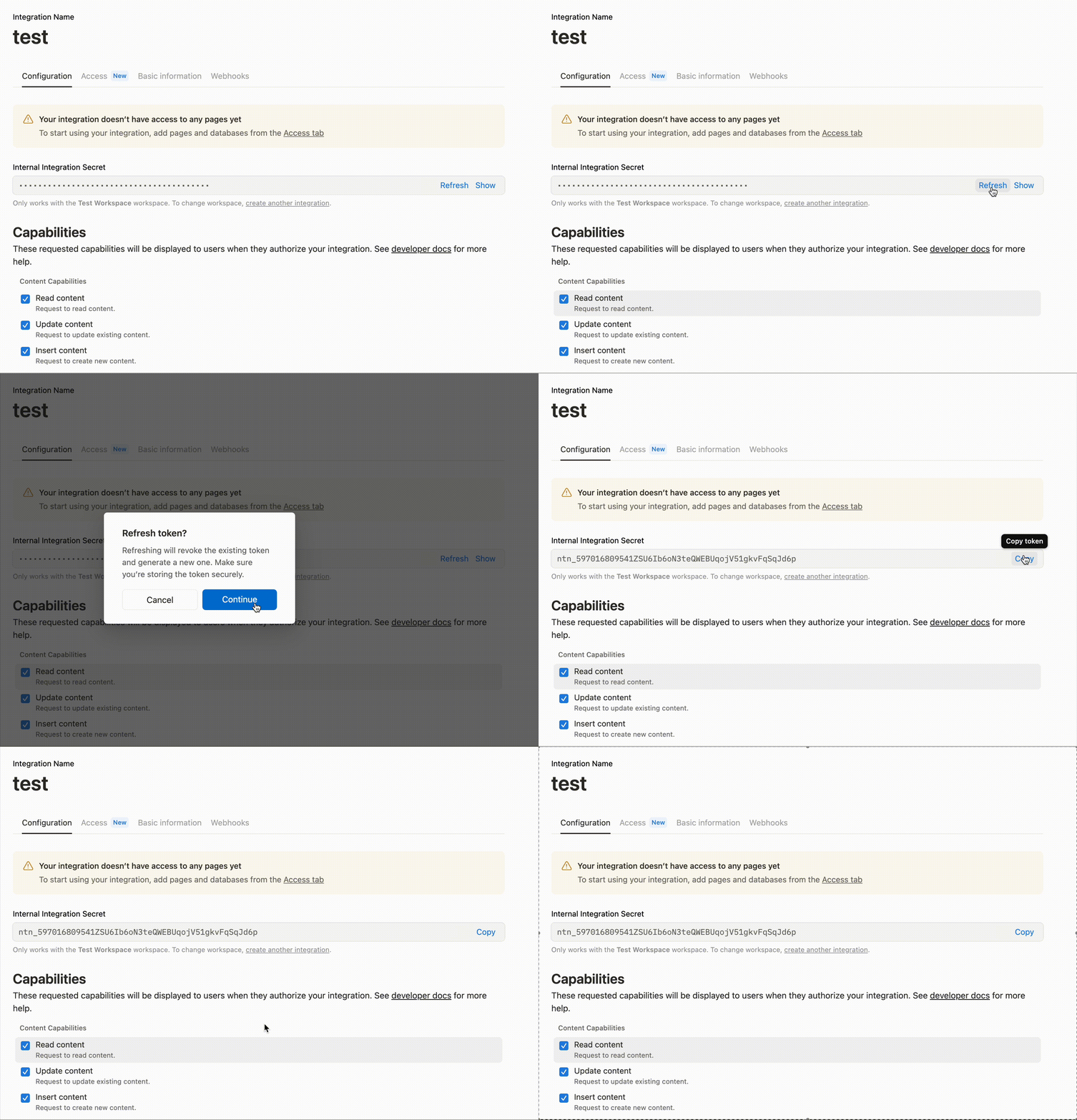
Click **Refresh** on your connection, or revoke the personal access token
### Step 2 - Generate a new API key
Rotate the compromised key by clicking **Refresh** in your connections page and update your applications with your new key. For a compromised PAT, revoke the old token and create a new PAT.
 ### Step 3 - review recent activity
Check your workspace for any suspicious activity
Review recent changes to pages and databases
Look for any unauthorized connections in **Settings & members** → **Connections**
### Step 4 - update your applications
* Replace the old API key in all your applications and environments
* Test that your connections are working with the new key
* Remove the old key from any configuration files or documentation
## Getting help
If you need assistance with API key security or suspect unauthorized access, contact [Notion support](https://www.notion.com/help) at [team@makenotion.com](mailto:team@makenotion.com)
### Step 3 - review recent activity
Check your workspace for any suspicious activity
Review recent changes to pages and databases
Look for any unauthorized connections in **Settings & members** → **Connections**
### Step 4 - update your applications
* Replace the old API key in all your applications and environments
* Test that your connections are working with the new key
* Remove the old key from any configuration files or documentation
## Getting help
If you need assistance with API key security or suspect unauthorized access, contact [Notion support](https://www.notion.com/help) at [team@makenotion.com](mailto:team@makenotion.com)